
AI photo generation has changed the way people create and edit pictures. Instead of spending hours in an editing app, you can now describe the image you want and let an AI tool handle much of the creative work. Google Gemini is one of the popular options for generating and editing images, including personal photos, creative scenes, cartoon-style images and couple pictures.
The important part is not simply typing “make a good photo.” A better prompt gives Gemini clear information about the subject, activity, environment and visual style. Google itself recommends describing the image in detail and specifying the style you want, such as photorealistic, watercolor or cartoon illustration.
This guide covers useful Gemini AI photo prompt copy paste ideas, including couple prompts, family photo prompts, romantic scenes, cartoon concepts and other popular prompt formats.
What Is a Gemini AI Photo Prompt?
A Gemini AI photo prompt is simply an instruction that tells Gemini what image you want to create or how you want an existing image changed.
For example, instead of writing:
“Make our photo romantic.”
You could describe the setting, clothing, lighting, pose and mood. That gives the image generator much more useful direction.
Google recommends beginning image requests with words such as “draw,” “generate” or “create,” followed by a detailed description of the subject, action, background and visual style.
That is why a good couple prompt for Gemini AI usually contains more than just the words “romantic couple.”
Gemini AI Photo Prompt Copy Paste for Couples
Couple images are among the most common uses for AI photo generation. You can use a Gemini AI couple photo prompt copy paste to transform an ordinary picture into a cinematic, romantic or creative scene.
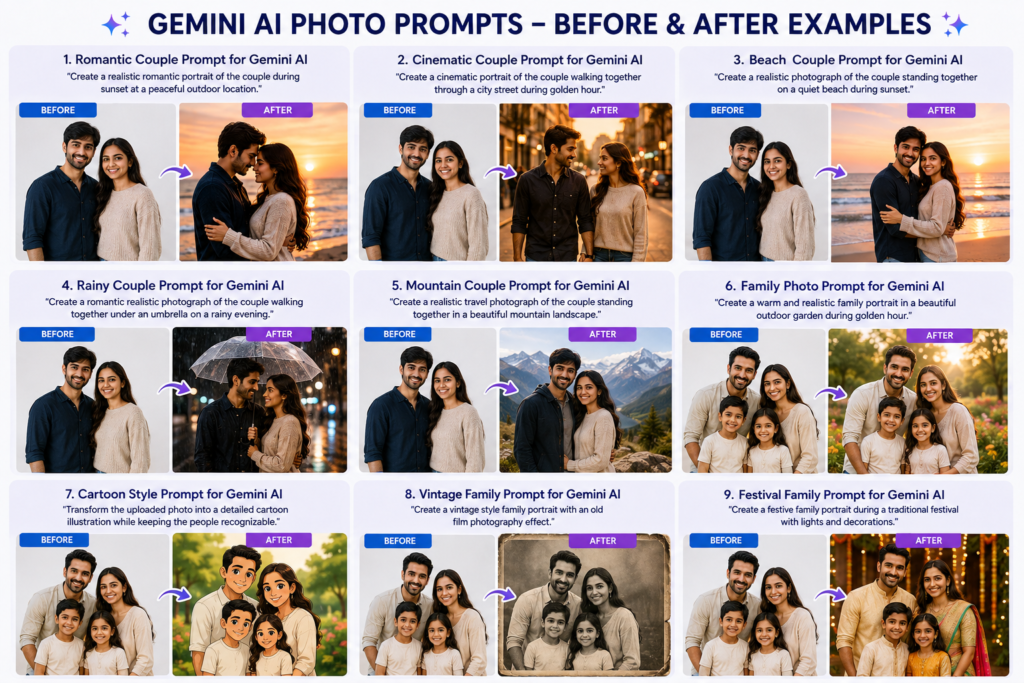
Romantic Couple Prompt for Gemini AI
Prompt:
“Create a realistic romantic portrait of the couple from the uploaded photo. Keep their facial identity and natural features consistent. Place them together during a beautiful sunset at a peaceful outdoor location. Use warm natural lighting, realistic skin texture, subtle expressions and natural body language. Make the image look like a professionally photographed couple portrait, with a soft cinematic background and realistic depth of field.”
This works as a couple romantic prompt for Gemini AI because it tells Gemini what to preserve and what kind of environment and mood to create.
Couple Prompt Gemini – Cinematic Style
Prompt:
“Create a cinematic portrait of the couple from the reference photo walking together through a beautiful city street during golden hour. Keep their faces recognizable and natural. Add realistic lighting, natural clothing details, subtle background blur and a premium photography look. The final image should feel like a real photograph rather than an artificial AI image.”
You can modify the location to a beach, garden, mountain, café or historical location.
Google Gemini Couple Photo Prompt Ideas
A google Gemini couple photo prompt does not need to follow a secret formula. The same basic prompting principles apply.
Try these concepts:
- Couple walking beside a beach during sunset
- Traditional Indian couple portrait
- Winter couple photography
- Casual café date
- Mountain travel couple
- Wedding-style portrait
- Rainy romantic street scene
- Festival-themed couple photograph
For better results, explain the scene instead of stuffing the prompt with unnecessary keywords.
For example, couple prompt for Gemini can specify:
Subject + pose + location + lighting + clothing + photography style + important details
This simple structure makes prompts easier to customise.
Romantic Couple AI Prompts for Different Scenes
A romantic couple AI prompts collection becomes more useful when each prompt creates a different visual situation.
Beach Scene
“Create a realistic photograph of the couple standing together on a quiet beach during sunset. Keep their facial features natural and recognizable. Add gentle ocean waves, warm sunset lighting, realistic shadows and subtle cinematic depth of field.”
Rainy Scene
“Create a romantic realistic photograph of the couple walking together under one umbrella on a rainy evening street. Add reflections on the wet road, soft street lights and natural expressions. Keep the people realistic and maintain their recognizable facial features.”
Mountain Scene
“Create a realistic travel photograph of the couple standing together in a beautiful mountain landscape. Use natural daylight, realistic clothing, detailed surroundings and authentic photography composition.”
These are examples of couples Gemini prompt ideas that you can adjust according to your own photographs.
Family Photo Prompts
AI image generation is not limited to couples. Family photo prompts can help create creative portraits when you want a particular location, mood or photography style.
For example:
“Create a warm and realistic family portrait using the uploaded reference photo. Keep each family member recognizable and natural. Place the family together in a beautiful outdoor garden during golden hour. Use natural smiles, realistic clothing details, soft sunlight and professional family photography composition.”
If you are editing an existing family picture, clearly explain what should remain unchanged and what you want to modify.
Gemini currently supports image uploads and can edit uploaded images or combine multiple reference images for image creation, depending on the available model and feature access.
Prompt Scene Ideas for Gemini
A prompt scene becomes more effective when you think like a photographer.
Ask yourself:
- Who is in the image?
- What are they doing?
- Where are they?
- What time of day is it?
- What are they wearing?
- What mood should the image have?
- What photography style should be used?
For example, “couple at sunset” is a basic instruction.
“Couple standing beside a quiet lake during golden hour, wearing casual winter clothing, looking naturally at each other, warm sunlight, realistic skin texture, professional outdoor photography and soft background blur” is much more specific.
The second version gives the image model more visual information to work with.
Cartoon and Creative Gemini Prompts
If you are searching for a prompt seen cartoon, you may actually be looking for cartoon-scene prompts or prompts that turn photographs into illustrated styles.
A simple example is:
“Transform the uploaded family photograph into a detailed cartoon illustration while keeping the people recognizable. Preserve the main composition and expressions, use clean illustrated lines, soft colors and a polished animated-film-inspired appearance.”
Google lists cartoon illustration as one example of a style that can be specified in image-generation prompts.
You can also experiment with watercolor, charcoal, illustration and other visual directions.
New Trending Prompt Ideas
A new trending prompt is not necessarily a special technical command. Trends change quickly, and many viral prompts simply combine a familiar photograph with a creative setting or visual style.
Some useful ideas include:
- Cinematic travel portrait
- Vintage family photograph
- Luxury editorial portrait
- Rainy-night couple scene
- Traditional festival portrait
- Cartoon family illustration
- Magazine-style fashion portrait
- Old-film photography effect
The trick is to describe the visual result rather than copying random words from social media. A prompt that works well for one image may produce a completely different result with another image.
Gemini Prompt Vercel App: What Does It Mean?
You may also come across searches such as Gemini prompt Vercel app. This phrase generally relates to building AI-powered applications with Gemini or other models using Vercel’s developer tools.
Vercel’s AI SDK provides a unified TypeScript SDK for building AI applications and supports multiple model providers.
This is different from simply using a Gemini image prompt in the Gemini app.
If you are a normal user looking for photo prompts, you do not need Vercel to create a Gemini image. If you are a developer building an AI application, however, Vercel’s AI SDK can be relevant.
What About “Mera Prompt”?
The phrase mera prompt is often used casually when people share their own customised AI prompt online. There is no universal “Mera Prompt” command that automatically unlocks a special Gemini image feature.
Instead, create your own prompt based on the image you want.
For example:
“Use my uploaded photograph as the reference. Keep my facial identity, hairstyle and natural appearance consistent. Change the background to a luxury rooftop restaurant at night. Add realistic ambient lighting, natural shadows and professional portrait photography.”
That is your prompt—and you can keep modifying it until the result matches your idea.
Couple Prompt ChatGPT vs Couple Prompt Gemini
People often search for couple prompt ChatGPT, couple prompt Gemini, and gemini prompt couple interchangeably.
The basic concept is similar: you describe the desired result clearly. However, the exact capabilities and interface can vary between AI tools and models.
If your goal is image generation or image editing inside Gemini, write the prompt specifically for the visual result you want. Gemini’s official guidance recommends describing the subject, action, background and visual style rather than relying on vague instructions.
How to Make a Better Couple Gemini Prompt
A strong couple Gemini prompt usually includes five important elements:
1. Describe the People
Mention whether the image contains a couple, family or individual.
2. Describe the Scene
Tell Gemini where the people should be. A beach, restaurant, garden, city street and mountain location will produce very different compositions.
3. Describe the Mood
Use clear terms such as romantic, cheerful, peaceful, cinematic or elegant.
4. Describe the Visual Style
You can request realistic photography, cartoon illustration, watercolor or another visual direction.
5. Mention Important Restrictions
If you upload a reference image, explain what should remain consistent, such as facial identity, clothing or composition.
This approach is more useful than simply repeating couple gemini prompt, gemini prompt couple, or couple prompt for gemini several times.
What Is the Haryana DC Jobs Presets Prompt?
The phrase haryana dc jobs presets prompt appears to be a search-style keyword rather than an established Gemini image feature. If you are using it because you saw a viral prompt, check the original source before presenting it as an official Gemini feature.
The same rule applies to other viral prompt names. A keyword can be popular without being an official Google feature.
That distinction matters because Gemini’s official documentation describes image generation through prompts and supported image features, but it does not establish every social-media prompt name as an official feature.
Important Tips Before Using AI Photo Prompts
Do not assume that every AI-generated image will be perfect on the first attempt. Gemini itself warns that its responses can contain mistakes, so users should review generated content rather than blindly relying on it.
Also be careful when uploading photographs of other people. Google specifically reminds users not to violate other people’s privacy or copyright rights when generating or editing images.
If the first result looks strange, improve the prompt instead of adding fifty random keywords. Tell Gemini exactly what needs to change.
For example:
“Keep the same faces but make the hands natural, correct the lighting and place the couple slightly farther from the camera.”
Clear instructions usually beat keyword stuffing.
Frequently Asked Questions (FAQs)
1. What is a Gemini AI photo prompt?
A Gemini AI photo prompt is a written instruction that tells Gemini what kind of image you want to create or how you want to edit an existing photo. A detailed prompt can include the subject, background, lighting, pose, mood, and visual style.
2. Can I use these Gemini AI couple photo prompts by copy-pasting them?
Yes. You can copy and paste the prompts into Gemini and then customize details such as location, clothing, lighting, pose, and mood according to your requirements.
3. How do I create a romantic couple photo with Gemini AI?
Upload your reference photo and describe the romantic scene you want. Mention details such as sunset lighting, location, pose, clothing, expressions, and realistic photography style for more specific results.
4. Can Gemini create family and cartoon-style photos?
Yes. Gemini can generate and edit images in different visual styles. You can request family portraits, cartoon illustrations, cinematic scenes, vintage effects, and other creative concepts depending on the available Gemini image features.
5. How can I get better results from Gemini AI photo prompts?
Use clear and specific instructions instead of adding random keywords. Describe the people, scene, pose, lighting, background, mood, and desired style. If the first result is not right, give Gemini a follow-up instruction explaining exactly what you want changed.
Final Thoughts
The best Gemini AI photo prompt copy-paste is not necessarily the longest prompt. It is the one that clearly explains the image you want.
Whether you need a couple prompt for Gemini AI, a romantic scene, family photo prompts, a cartoon transformation or a creative travel photograph, focus on the subject, scene, mood, style and important details.
You can also use your own couple prompt Gemini variations instead of copying the same viral prompt everywhere. That gives you more control and makes experimentation much easier.
And remember: a “trending prompt” is only a starting point. The real magic happens when you describe your own idea clearly. After all, even Gemini cannot read your mind—at least not yet.
Sources
- Google Gemini Help – Generate and edit images
- Google Search Central – Guidance on generative AI content
- Google Search Central – AI-generated content guidance
- Vercel AI SDK

Akshay Saini is an AI and technology writer at KeyArtificial, covering ChatGPT, Google Gemini, AI prompts, AI tools, AI image generation, photo editing trends, and emerging AI developments.