AI Coding Tools
AI coding tools have evolved far beyond simple code autocomplete. Modern AI coding assistants can help developers understand unfamiliar codebases, generate functions, find bugs, refactor code, write tests, explain errors and, in some cases, work across multiple files to complete larger development tasks.
Looking for the best AI for coding free can help beginners and developers write better code without increasing their software costs. Free AI coding tools can generate code, explain programming concepts, find errors, improve existing code, and support multiple programming languages. The right tool can save development time and make coding easier for projects such as websites, apps, and software. For SEO, AEO, and GEO, helpful coding content can answer user questions and improve visibility across search and AI platforms.
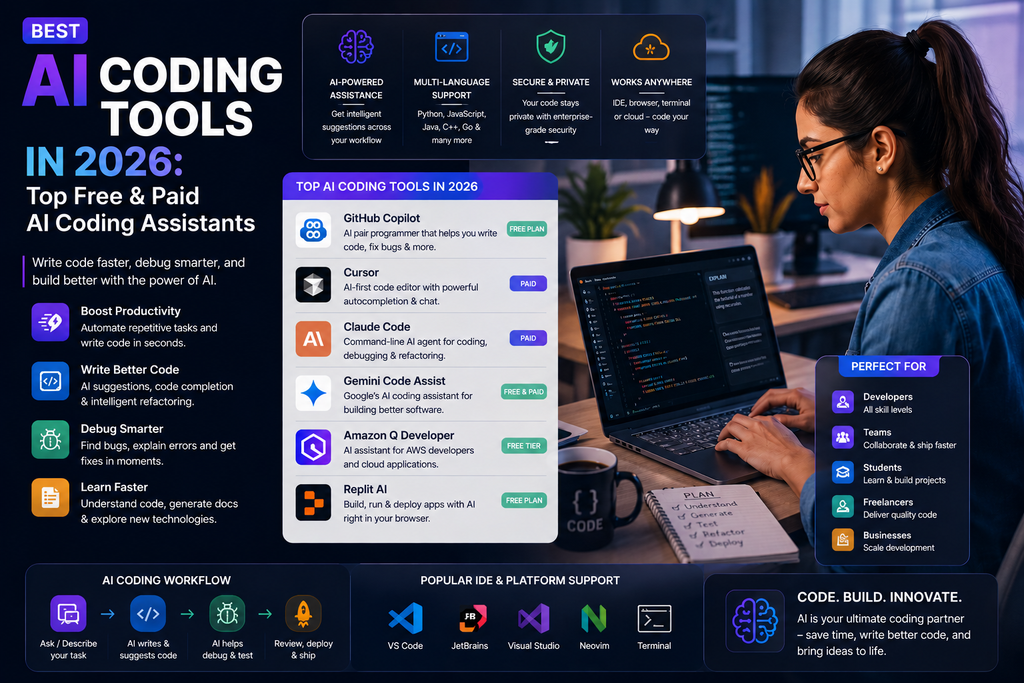
That creates a new problem:
Which AI coding tool should you actually use?
Some AI coding tools work directly inside your IDE. Others are AI-first code editors. Some work mainly through the terminal, while newer coding agents can take a task, inspect a repository, make changes, run tests and prepare work for human review.
In this guide, we compare some of the best AI coding tools in 2026 for beginners, professional developers, teams and businesses.
The best AI coding tool depends on your workflow. GitHub Copilot is a strong all-round choice for developers who want AI across GitHub and popular IDEs. Cursor is designed around an AI-first coding environment, while Claude Code is useful for agentic development from the terminal. Other tools may be better depending on your programming language, IDE, team and development process.
Best AI Coding Tools at a Glance
| AI Coding Tool | Best For | Free Option | Ideal User |
|---|---|---|---|
| GitHub Copilot | Overall development workflow | Yes | Most developers |
| Cursor | AI-first code editing | Check current plan | Professional developers |
| Claude Code | Terminal-based agentic coding | Check current plan | Advanced developers |
| Gemini Code Assist | Google ecosystem & coding assistance | Yes/Check plan | Developers and teams |
| OpenAI Codex | Agentic software development | Depends on access | Developers using OpenAI |
| Windsurf | AI-first development | Check current plan | Developers |
| Amazon Q Developer | AWS development | Yes/Check plan | AWS developers |
| Replit | Coding and rapid prototyping | Yes/Check plan | Beginners and builders |
Pricing, free limits, supported models and features change frequently. Always check the official product page before choosing a paid plan.
What Is an AI Coding Tool?
An AI coding tool is software that uses artificial intelligence to help developers write, understand, test, debug or maintain software.
Early AI coding assistants focused heavily on predicting the next line of code.
Modern tools can do much more.
Depending on the platform, an AI coding assistant may help you:
- Generate code
- Complete code
- Explain unfamiliar code
- Debug errors
- Refactor functions
- Generate tests
- Write documentation
- Search a codebase
- Review code
- Work across multiple files
- Run terminal commands
- Plan implementations
- Create pull requests
- Complete development tasks as an agent
This is why the category is increasingly moving from AI code completion toward AI coding agents.
AI Coding Assistant vs AI Coding Agent
These terms are increasingly important.
AI Coding Assistant
A coding assistant primarily helps while you work.
For example, it may:
- Suggest the next line
- Explain code
- Generate a function
- Answer a programming question
- Suggest a bug fix
You remain in control of most individual steps.
AI Coding Agent
A coding agent can take a larger objective and work through several steps.
For example:
Add password-reset functionality to this application and write tests for it.
An agent may then:
Understand the repository → Create a plan → Edit several files → Run tests → Fix problems → Present the changes for review
The distinction is not always absolute because many modern coding products now support both assistant and agent workflows.
1. GitHub Copilot — Best Overall AI Coding Tool
GitHub Copilot has expanded significantly beyond its original role as an AI autocomplete tool.
It now works across GitHub, IDEs and command-line workflows and includes both interactive assistance and agentic development features.
Best for
- Code completion
- IDE assistance
- Debugging
- Code explanation
- Agentic development
- Code review
- Pull requests
- Professional teams
- GitHub users
Why consider GitHub Copilot?
One of Copilot’s biggest advantages is that it can fit into tools developers already use.
It supports development environments including:
- Visual Studio Code
- Visual Studio
- JetBrains IDEs
- Xcode
- Neovim
- Eclipse
Modern Copilot workflows go beyond autocomplete.
Agent mode can analyse a codebase, propose changes, edit multiple files, run tests and validate its work.
Copilot’s cloud agent can also work on development tasks asynchronously and return a pull request for review.
Example prompt
Review the authentication module in this repository. Identify duplicated logic, security concerns and missing tests. Create an implementation plan before changing any code.
Pros
- Strong GitHub integration
- Works across multiple IDEs
- Code completion
- Agent mode
- Code review
- Repository-aware assistance
- Free plan available
- Multiple model options
Limitations
- AI-generated code still requires review
- Advanced agent usage can consume additional credits
- The large number of features may be unnecessary for casual programmers
Verdict
Choose GitHub Copilot if you want a mature AI coding assistant that integrates with your existing IDE and GitHub workflow.
2. Cursor — Best AI-First Code Editor
Cursor takes a different approach.
Instead of adding AI to an existing development environment, Cursor is designed as an AI-focused code editor.
That makes it appealing to developers who want AI deeply integrated into how they navigate, understand and modify a project.
Best for
- AI-assisted programming
- Large codebases
- Multi-file editing
- Code generation
- Refactoring
- Agentic development
- Professional developers
Why consider Cursor?
Developers increasingly need AI to understand more than the currently open file.
Imagine asking:
Find every place where our old payment API is used and migrate the project to the new API.
That requires understanding relationships across multiple files.
An AI-first editor is designed around this broader context.
Pros
- AI-focused development environment
- Strong codebase context
- Useful for multi-file changes
- Agent-style workflows
- Familiar editor experience for many developers
Limitations
- Requires moving to a different editor if you currently use another IDE
- Advanced usage may require a paid plan
- AI-generated changes still need review and testing
Verdict
Choose Cursor if you want AI to be at the center of your code-editing workflow rather than an additional IDE feature.
3. Claude Code — Best for Terminal-Based Agentic Coding
Claude Code takes AI development into the command-line workflow.
It is designed for developers who want an AI coding agent that can understand a codebase, make changes and assist with development tasks from the terminal.
Best for
- Terminal users
- Agentic development
- Repository analysis
- Debugging
- Refactoring
- Multi-file changes
- Advanced developers
Why consider Claude Code?
Many experienced developers spend a significant amount of time in the terminal.
Instead of switching between:
Terminal → Browser chatbot → Editor → Terminal
a terminal-based coding agent can work closer to the actual development environment.
For example:
Find why the checkout tests started failing after the latest API change. Explain the cause before making changes.
A good agentic workflow allows you to inspect the plan before accepting major modifications.
Pros
- Terminal-oriented workflow
- Strong for codebase-level tasks
- Useful for debugging
- Agentic development capabilities
- Suitable for advanced workflows
Limitations
- Terminal workflows may be intimidating for beginners
- Usage costs and limits should be monitored
- Generated code still requires human review
Verdict
Choose Claude Code if you are comfortable in the terminal and want an agent that can work across a repository rather than simply suggest the next line of code.
4. Gemini Code Assist — Best for Google Ecosystem Developers
Gemini Code Assist is Google’s AI coding assistant for software development.
It can help developers generate, explain and transform code and can fit naturally into workflows that already use Google Cloud and Google’s AI ecosystem.
Best for
- Code generation
- Code explanation
- Google Cloud
- Enterprise development
- IDE assistance
- Developers using Gemini
Why consider Gemini Code Assist?
The right AI coding tool is not always the one with the longest feature list.
Integration matters.
If your team already works heavily with:
- Google Cloud
- Gemini
- Google’s developer ecosystem
then Gemini Code Assist can make more sense than introducing a completely separate platform.
Pros
- Strong Google ecosystem connection
- Coding assistance
- Useful for cloud developers
- Options for individuals and organizations
Limitations
- Developers outside Google’s ecosystem may prefer alternatives
- Features can vary by edition
- AI-generated code still needs testing
Verdict
Consider Gemini Code Assist if your development workflow is already centered on Google and Google Cloud.
5. OpenAI Codex — Best for OpenAI Agentic Development Workflows
Codex represents OpenAI’s agentic approach to software development.
Rather than focusing only on autocomplete, coding agents can take larger software tasks and work through them with more autonomy.
Best for
- Agentic coding
- Repository tasks
- Feature development
- Debugging
- Code review
- Developers using OpenAI workflows
Why consider Codex?
The biggest shift in AI coding is from:
Complete this line.
to:
Investigate this issue and implement the fix.
The second task requires planning, context and multiple actions.
That is where coding agents become more interesting.
Pros
- Agentic development approach
- Useful for larger coding tasks
- Can assist with codebase-level work
- Suitable for developers already using OpenAI
Limitations
- Agent output requires careful review
- Availability and capabilities can change
- Not every coding task should be delegated
Verdict
Consider Codex when you want an AI coding agent capable of working on larger development tasks rather than only generating snippets.
6. Windsurf — AI-First Development Environment
Windsurf is another AI-focused development environment designed around modern agentic programming workflows.
Best for
- AI-assisted development
- Codebase understanding
- Multi-file work
- Agent workflows
- Developers exploring AI-first IDEs
Why consider Windsurf?
The AI coding market is increasingly divided between:
AI added to traditional IDEs
and
IDEs designed around AI from the beginning.
Windsurf belongs more closely to the second category.
That makes it worth comparing with Cursor if you are considering moving to an AI-first editor.
Pros
- AI-focused workflow
- Useful for codebase-level work
- Agent-style development
- Designed around modern AI programming
Limitations
- Switching editors can disrupt an established workflow
- Features and plans change quickly
- Human review remains essential
Verdict
Compare Windsurf with Cursor if you want an AI-first development environment.
7. Amazon Q Developer — Best for AWS Developers
Amazon Q Developer is particularly relevant to developers building and maintaining applications within the AWS ecosystem.
Best for
- AWS development
- Cloud applications
- Code assistance
- AWS services
- Enterprise developers
Why consider Amazon Q Developer?
Cloud developers frequently need help with more than programming syntax.
They may need to understand:
- Cloud services
- Infrastructure
- Configuration
- Deployment
- AWS-specific workflows
A coding assistant integrated with the same cloud ecosystem can be valuable.
Pros
- Strong fit for AWS users
- Useful for cloud development
- Development assistance
- Enterprise relevance
Limitations
- Less compelling if you rarely use AWS
- Cloud recommendations still require verification
- Configuration mistakes can have real costs and security consequences
Verdict
Consider Amazon Q Developer if AWS is a major part of your development environment.
8. Replit — Best for Beginners and Rapid Prototyping
Replit combines coding, hosting and AI-assisted development in a browser-based environment.
This makes it particularly interesting for beginners and people who want to move quickly from an idea to a working prototype.
Best for
- Beginners
- Prototypes
- Small applications
- Learning
- Browser-based coding
- Fast experimentation
Why consider Replit?
Traditional software development can require:
- Installing an editor
- Installing languages
- Configuring environments
- Setting up dependencies
- Deploying an application
Browser-based development can reduce some of that setup.
This is especially useful for beginners who want to focus on building.
Pros
- Browser-based
- Beginner-friendly
- Good for prototypes
- Combines coding and deployment workflows
- AI assistance available
Limitations
- Complex professional projects may require a different environment
- Beginners should still learn the code they generate
- AI should not replace programming fundamentals
Verdict
Consider Replit if you are learning to code or want to build and test prototypes quickly.
Best Free AI Coding Tools
You do not necessarily need to pay for an AI coding assistant immediately.
Several platforms provide free plans or limited free access.
A good starting strategy is to test tools on real programming tasks.
For example:
GitHub Copilot
GitHub currently offers a free Copilot plan with limited usage.
Gemini Code Assist
Google provides coding assistance options for individual developers.
Replit
Free or limited access can make it useful for experimentation.
Other AI coding tools may offer trials, credits or limited plans.
Always check current limits before choosing a tool based solely on price.
Which Free AI Coding Tool Should You Start With?
For a beginner:
Start with a tool that explains its code rather than simply generating large amounts of it.
For an existing GitHub developer:
Try GitHub Copilot Free first.
For a Google-focused developer:
Explore Gemini Code Assist.
For browser-based learning:
Try Replit.
The best free AI coding tool is the one that fits your existing development environment.
Best AI Coding Tool by Use Case
Best overall
GitHub Copilot
Strong combination of IDE support, GitHub integration, code completion and agent workflows.
Best AI-first editor
Cursor
Designed around AI-assisted development.
Best terminal coding agent
Claude Code
Useful for developers who prefer terminal-based agentic workflows.
Best for Google developers
Gemini Code Assist
Good fit for Google and Google Cloud environments.
Best for agentic software development
Codex
Worth considering for larger delegated development tasks.
Best for AWS developers
Amazon Q Developer
Natural option for AWS-centered development.
Best for beginners
Replit
Easy browser-based environment for learning and prototyping.
Best AI Coding Tools for Beginners
AI can make programming easier to learn—but it can also create a bad habit.
If a beginner asks AI to build everything without understanding the result, they may produce software they cannot debug.
Instead, use AI as a tutor.
Bad beginner prompt
Build this entire app for me.
Better prompt
Help me build a simple to-do app in Python. Explain each step before writing the code. After each section, ask me a question to make sure I understand it.
AI can help beginners:
- Understand syntax
- Explain errors
- Learn algorithms
- Review code
- Generate exercises
- Understand documentation
The goal should be learning faster, not avoiding learning.
Best AI Coding Tools for Professional Developers
Professional developers usually need more than code generation.
They need tools that understand:
- Existing architecture
- Repository conventions
- Tests
- Dependencies
- Multiple files
- Pull requests
- Documentation
That makes codebase context increasingly important.
For professionals, compare:
GitHub Copilot for ecosystem integration.
Cursor for an AI-first editor.
Claude Code for terminal workflows.
Codex for agentic tasks.
The best choice depends heavily on where you already work.
Best AI Coding Tools for Web Development
AI coding tools can assist with:
- HTML
- CSS
- JavaScript
- TypeScript
- React
- Backend development
- APIs
- Databases
- Testing
For example:
Review this React component for accessibility, unnecessary re-renders and error-handling problems. Explain each recommendation before modifying the code.
That is usually more useful than:
Improve this code.
Specific instructions create better results.
Best AI Coding Tools for Python
AI assistants can help Python developers:
- Explain exceptions
- Generate functions
- Refactor scripts
- Write tests
- Analyse data code
- Improve documentation
- Understand libraries
Example:
Review this Python function for correctness, readability and performance. Identify problems first, then show a revised version with an explanation of every change.
Best AI Coding Tools for Debugging
Debugging is one of the strongest AI coding use cases.
Instead of giving AI only an error message, provide:
- The error
- Relevant code
- Expected behavior
- Actual behavior
- Recent changes
- Environment details
For example:
This API request should return the user’s profile, but it returns a 401 after the authentication refactor. Here is the error, route handler and middleware. Identify the likely cause before suggesting a fix.
The more relevant context you provide, the easier it is for the assistant to investigate.
Best AI Coding Tools for Code Review
AI can also provide an additional review layer.
Ask it to check for:
- Logic errors
- Missing error handling
- Security concerns
- Duplicated code
- Poor naming
- Missing tests
- Performance problems
- Accessibility issues
But AI review should supplement—not automatically replace—human review for important software.
How to Use AI Coding Tools Effectively
1. Give Context
Instead of:
Fix this.
Explain:
This Node.js API endpoint returns a 500 error when the database query returns no user. Identify the cause and suggest the smallest safe fix.
2. Ask for a Plan First
For larger changes:
Analyse the repository and create an implementation plan. Do not edit files until I approve the plan.
This can prevent unnecessary changes.
3. Make Small Changes
Break large tasks into smaller pieces.
4. Ask the AI to Test Its Work
Where supported:
Run the relevant tests after making the change and report any failures.
5. Review the Diff
Never approve a large AI-generated change without understanding what changed.
6. Use Version Control
Commit working code before major AI-assisted modifications.
This gives you a safe recovery point.
Example AI Coding Prompts
Explain Code
Explain this function step by step. Assume I understand basic Python but not this library.
Debug Code
Find the likely cause of this error. Explain the problem before changing anything.
Refactor Code
Refactor this function for readability without changing its behavior. Explain every significant change.
Generate Tests
Write unit tests for this function, including normal cases, edge cases and expected failures.
Review Code
Review this code for security, performance and maintainability problems. Rank the issues by severity.
Understand a Repository
Analyse this repository structure and explain the main components, data flow and likely entry points. Do not modify anything.
Implement a Feature
Create an implementation plan for adding dark mode to this application. Identify the files likely to change and potential risks. Wait for approval before editing.
AI Coding Tools vs Traditional Coding
AI coding does not eliminate traditional programming knowledge.
Developers still need to understand:
- Algorithms
- Architecture
- Databases
- Security
- Testing
- APIs
- Version control
- Debugging
AI changes how quickly developers can work, but not the need to understand what software is doing.
A developer who understands the system can judge whether an AI suggestion is safe.
A developer who blindly accepts generated code cannot.
Can AI Coding Tools Build an Entire App?
Increasingly, yes—for certain applications and prototypes.
Modern coding agents can create multiple files, install dependencies, run commands and iterate on errors.
But “AI generated an app” does not automatically mean:
- The architecture is good
- The app is secure
- The code is maintainable
- Edge cases are handled
- The software is production-ready
The larger and more important the application, the more human review matters.
Are AI Coding Tools Safe?
AI-generated code can contain:
- Bugs
- Security vulnerabilities
- Outdated approaches
- Incorrect APIs
- Unnecessary dependencies
- Logic errors
Treat AI-generated code like code written by an unfamiliar contributor.
Review it.
Test it.
Understand it.
Then merge it.
Can AI Coding Tools Create Security Problems?
Yes.
This is particularly important when AI can:
- Execute terminal commands
- Install packages
- Modify configuration
- Access development tools
- Interact with repositories
Give coding agents only the permissions they genuinely need.
Do not expose passwords, production credentials or secrets unnecessarily.
For sensitive software, follow your organization’s security and code-review policies.
Are AI Coding Tools Good for Productivity?
They can be extremely useful when applied to the right tasks.
AI is particularly good at accelerating:
- Boilerplate
- Documentation
- Tests
- Code explanations
- Repetitive changes
- Initial debugging
- Refactoring suggestions
The productivity benefit may be smaller when the problem requires deep business knowledge, architectural judgement or unclear requirements.
Use AI where it removes mechanical work so developers can spend more time thinking about the actual product.
How This Article Supports AEO
AEO (Answer Engine Optimization) means making important questions easy to answer directly.
What are the best AI coding tools in 2026?
Popular AI coding tools include GitHub Copilot, Cursor, Claude Code, Gemini Code Assist, OpenAI Codex, Windsurf, Amazon Q Developer and Replit. The best option depends on your IDE, programming language, cloud platform and whether you need code completion or a more autonomous coding agent.
What is the best AI coding tool?
GitHub Copilot is a strong overall option because it integrates with GitHub and multiple development environments while supporting code completion, chat, code review and agent workflows. Developers who prefer AI-first editors may prefer Cursor, while terminal-focused developers may prefer Claude Code.
What is the best free AI coding tool?
GitHub Copilot currently offers a free plan with limited usage. Gemini Code Assist and other platforms also provide free or limited access. Compare current limits before choosing a tool.
What is an AI coding agent?
An AI coding agent is a system that can take a development task, analyse a codebase, plan changes and perform multiple actions such as editing files, running tests and preparing code for human review.
Can AI coding tools replace developers?
AI can automate many repetitive programming tasks, but professional software development still requires human judgement for architecture, requirements, security, testing and accountability.
How This Article Supports GEO
GEO (Generative Engine Optimization) means structuring useful, trustworthy information so generative search and answer systems can understand it clearly.
For KeyArtificial, strengthen this page with:
- Clear definitions
- Direct answers
- Original testing
- Comparison tables
- Primary sources
- Specific recommendations
- Author information
- Update dates
- Testing methodology
- Transparent limitations
- Current product information
Do not simply repeat what each company’s marketing page says.
The biggest opportunity is original KeyArtificial testing.
How KeyArtificial Should Test AI Coding Tools
To make this guide genuinely useful, test major coding assistants with the same tasks.
Test 1 — Code Generation
Ask each tool to create the same small feature.
Test 2 — Debugging
Give every tool the same broken application.
Test 3 — Code Explanation
Provide the same unfamiliar function.
Test 4 — Refactoring
Give every tool the same poorly structured code.
Test 5 — Unit Tests
Ask every tool to generate tests for the same function.
Test 6 — Repository Understanding
Give each agent the same sample project and ask it to explain the architecture.
Test 7 — Multi-File Feature
Ask agent-capable tools to implement the same feature across several files.
Score them on:
- Code correctness
- Prompt following
- Debugging ability
- Code quality
- Repository understanding
- Test quality
- Agent reliability
- Ease of use
- Speed
- Value
Then add a section such as:
Tested by Gurudeep Singh — August 2026
Explain exactly how the tools were tested and publish the results.
That gives KeyArtificial original information instead of another generic AI tools roundup.
Frequently Asked Questions
What are AI coding tools?
AI coding tools are software applications that use artificial intelligence to help developers generate, understand, debug, test, review and maintain code.
What is the best AI coding tool in 2026?
There is no universal winner. GitHub Copilot is a strong all-round option, Cursor focuses on an AI-first editor experience, Claude Code focuses on terminal-based agentic coding, and other tools may be better for specific ecosystems.
What is the best free AI coding tool?
GitHub Copilot currently has a free plan with limited usage, while other coding assistants also provide free or limited options. Always check current limits because plans change.
Which AI tool is best for Python coding?
GitHub Copilot, Cursor, Claude Code and other general coding assistants can all help with Python. The best option depends more on your preferred editor and workflow than on Python alone.
Which AI coding tool is best for beginners?
Beginners may benefit from tools that explain code and errors clearly. Replit can be useful for browser-based experimentation, while general coding assistants can act as programming tutors when prompted to explain their work.
Can AI coding tools fix bugs?
Yes. AI coding tools can help identify likely causes of bugs and suggest fixes. However, developers should test the fix and understand why the problem occurred.
Can AI write production-ready code?
AI can generate useful production code, but generated code should not automatically be considered production-ready. Review it for correctness, security, maintainability, performance and testing.
Are AI coding tools safe for private code?
That depends on the tool, plan and organizational settings. Before using an AI assistant with proprietary repositories, review its current privacy, data-handling and enterprise policies.
Will AI replace programmers?
AI is changing programming workflows, especially repetitive coding and debugging tasks. However, software development also requires architecture, product understanding, security judgement, communication and accountability.
Final Verdict: Which AI Coding Tool Should You Choose?
Start with your existing workflow.
GitHub Copilot: Best overall for developers who want AI integrated across GitHub and popular IDEs.
Cursor: Best for developers who want an AI-first code editor.
Claude Code: Best for terminal-oriented agentic development.
Gemini Code Assist: Strong option for Google and Google Cloud developers.
OpenAI Codex: Worth considering for agentic software-development tasks.
Windsurf: Another option for developers exploring AI-first development environments.
Amazon Q Developer: Best suited to AWS-centered development.
Replit: Good starting point for beginners and rapid prototypes.
Do not install every AI coding tool.
Choose two or three that match your environment and test them on the same real coding task.
Compare:
Correctness → Code quality → Context understanding → Speed → Control → Cost
The best AI coding tool in 2026 is not necessarily the one that generates the most code.
It is the tool that helps you create better software faster while keeping you in control of the final code.
For more categories, explore KeyArtificial’s Best AI Tools in 2026 pillar guide covering AI tools for writing, images, video, coding and more.
About the Author
Gurudeep Singh writes about artificial intelligence, AI tools and practical technology workflows at KeyArtificial.
His goal is to help readers understand fast-changing AI products through clear guides, practical comparisons and hands-on testing.