AI Tools Are Worth Using in 2026
AI is no longer just about asking a chatbot to write a paragraph. In 2026, the most useful AI tools can help with research, writing, coding, automation, image creation, video production, productivity, and everyday business tasks. However, with thousands of AI tools available, choosing the right ones can be confusing. The good news is that you do not need to subscribe to every new AI platform. For most people, the smartest approach is to choose one powerful general AI assistant and add a few specialist tools based on your work.
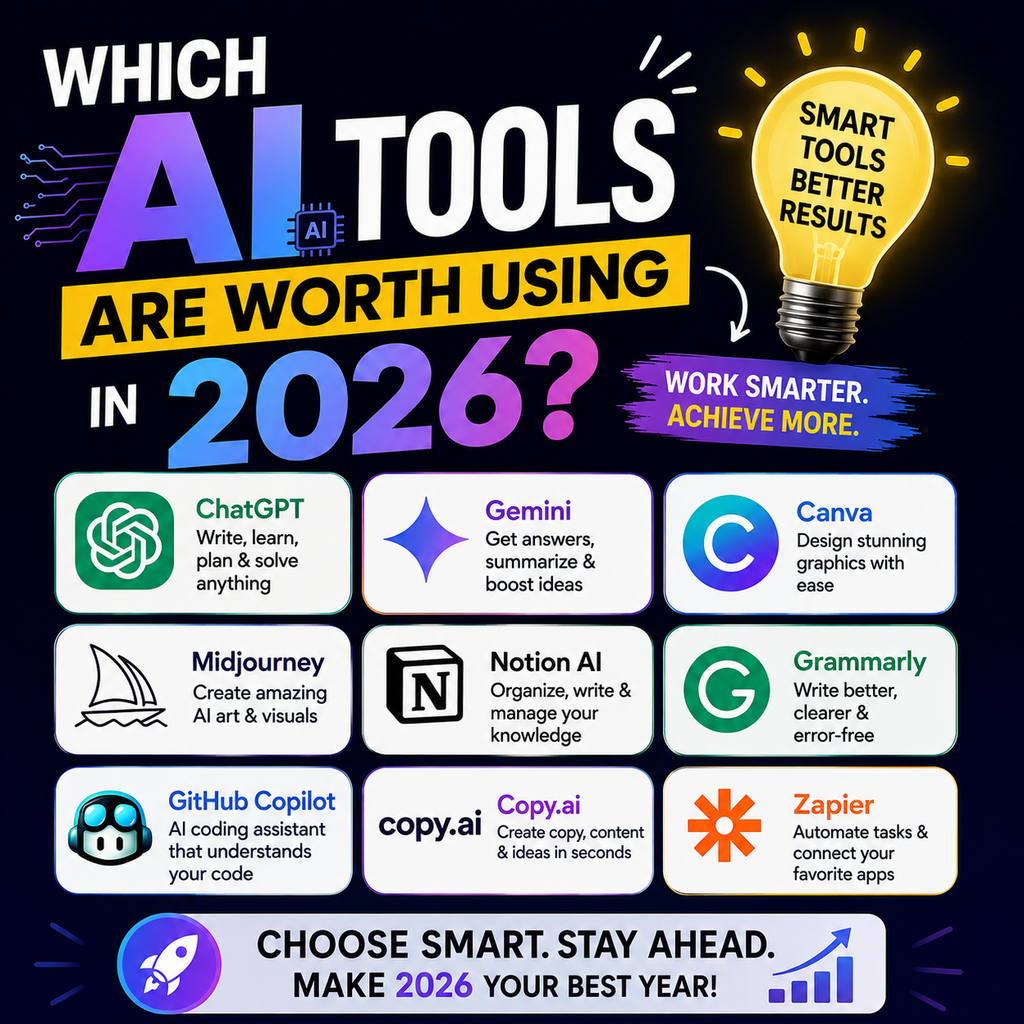
This guide explains the AI tools worth using in 2026, who they are best for, and how to choose the right AI stack for your needs. Current comparisons consistently highlight ChatGPT, Claude, Gemini, and Perplexity as leading choices for different types of work.
Which AI Tools Are Worth Using in 2026?
The best AI tools depend on what you want to accomplish.
- ChatGPT: Best all-around AI assistant
- Claude: Excellent for writing, analysis, and coding
- Gemini: Strong choice for Google users and multimodal tasks
- Perplexity: Best for research and source-based answers
- Midjourney: Popular for creative AI image generation
- Canva AI: Useful for quick marketing and design work
- Cursor: Valuable for AI-assisted coding
- Notion AI: Helpful for notes, documents, and knowledge management
- Grammarly: Useful for improving everyday writing
- Zapier or n8n: Strong options for workflow automation
The most effective strategy is to choose tools based on your workflow instead of trying to use every popular AI application.
Why Choosing the Right AI Tools Matters in 2026
AI tools can save time, but using too many tools can create another problem: tool overload.
You may end up switching between multiple platforms for tasks that one or two tools could handle.
Before choosing an AI tool, ask yourself:
- What task takes the most time?
- Do I need AI for writing, research, coding, or design?
- Do I need current information with sources?
- Does the tool integrate with software I already use?
- Can the free version handle my needs?
- Will the tool genuinely save me time?
The best AI tool is not necessarily the one with the most features. It is the one that fits naturally into your daily workflow.
Best AI Tools Worth Using in 2026
ChatGPT: Best All-Around AI Assistant
ChatGPT remains one of the most versatile AI tools for everyday work.
It can help with:
- Content writing
- Brainstorming
- Research assistance
- Data analysis
- File analysis
- Image generation
- Productivity tasks
- Learning
- Coding assistance
ChatGPT is a strong option for people who want one AI assistant that can support many different tasks from a single workspace. Current comparisons continue to rank it highly for broad, general-purpose workflows.
Best for: Students, marketers, freelancers, business owners, and general users.
Worth using in 2026? Yes, especially if you want one flexible AI assistant.
Claude: Best for Writing and Deep Analysis
Claude is widely used for tasks that require thoughtful writing, long documents, analysis, and coding.
It can be particularly useful for:
- Long-form blog content
- Document analysis
- Content editing
- Research summaries
- Coding workflows
- Complex writing tasks
Claude is often recommended when writing quality and sustained work with longer documents are priorities.
Best for: Writers, researchers, developers, and professionals working with detailed documents.
Worth using in 2026? Yes, particularly for serious writing and analytical work.
Gemini: Best for Google Users
Gemini is worth considering if your work already revolves around Google’s ecosystem.
It can support workflows involving:
- Gmail
- Google Docs
- Google Drive
- Google Sheets
- Research
- Multimodal tasks
Its connection with Google’s ecosystem makes it a practical choice for people who already spend most of their working day using Google services.
Best for: Google Workspace users, students, professionals, and Android users.
Worth using in 2026? Yes, especially if you already rely heavily on Google’s tools.
Perplexity: Best AI Tool for Research
Perplexity takes a research-first approach to AI search.
It is useful when you need:
- Current information
- Source-backed answers
- Research summaries
- Topic exploration
- Competitor research
- Market research
For marketers, students, and business professionals, having a research tool that clearly surfaces sources can be extremely useful.
Best for: Researchers, marketers, journalists, students, and business professionals.
Worth using in 2026? Absolutely, if research is part of your regular workflow.
Midjourney: Best for Creative AI Images
AI image generation continues to be useful for creative professionals and marketing teams.
Midjourney is commonly considered for creating:
- Concept art
- Creative visuals
- Social media images
- Advertising concepts
- Product visual ideas
However, always review generated images carefully before using them commercially.
Best for: Designers, marketers, content creators, and creative professionals.
Worth using in 2026? Yes, if high-quality creative visuals are an important part of your work.
Canva AI: Best for Everyday Marketing Design
Canva’s AI-powered features can help users create marketing materials more quickly.
You can use AI-assisted features for:
- Social media posts
- Presentations
- Marketing graphics
- Image editing
- Content creation
- Quick visual designs
It is especially useful for beginners who want to create professional-looking designs without learning complex software.
Best for: Small businesses, marketers, students, and social media managers.
Worth using in 2026? Yes, particularly for fast and practical design work.
Cursor: Best for AI-Assisted Coding
AI coding tools are becoming an important part of modern software development.
Cursor is designed to help developers work with AI directly inside their coding workflow.
It can assist with:
- Writing code
- Understanding existing code
- Debugging
- Refactoring
- Working across larger projects
Specialized coding tools can provide a more focused experience than using a general chatbot for every programming task.
Best for: Developers and technical teams.
Worth using in 2026? Yes, if coding is a regular part of your work.
Notion AI: Best for Productivity and Knowledge Management
Notion AI can be useful for people who already manage their work inside Notion.
It can help with:
- Summarizing notes
- Drafting documents
- Organizing information
- Creating action items
- Managing knowledge bases
The biggest advantage is convenience. Instead of moving information between multiple applications, AI assistance can happen within your workspace.
Best for: Teams, project managers, freelancers, and knowledge workers.
Worth using in 2026? Yes, if Notion is already part of your workflow.
Grammarly: Best for Improving Everyday Writing
AI writing tools are not only useful for creating content from scratch.
Grammarly can help improve:
- Grammar
- Clarity
- Tone
- Professional communication
- Emails
- Business writing
For professionals who write frequently, small improvements in communication can save time and reduce mistakes.
Best for: Students, professionals, marketers, and business teams.
Worth using in 2026? Yes, particularly for improving existing writing.
Zapier and n8n: Best for AI Automation
Automation is becoming one of the most valuable uses of AI.
Tools such as Zapier and n8n can help connect applications and automate repetitive workflows.
Possible automation tasks include:
- Sending leads to a CRM
- Creating follow-up workflows
- Organizing form submissions
- Moving data between applications
- Triggering notifications
- Connecting AI with business processes
Automation tools are particularly valuable when repetitive tasks consume a significant amount of time.
Best for: Businesses, agencies, marketers, and operations teams.
Worth using in 2026? Yes, when you have repetitive processes worth automating.
AI Tools Worth Using in 2026 by Category
| Category | Recommended AI Tool | Best For |
|---|---|---|
| General AI Assistant | ChatGPT | Everyday productivity |
| Writing and Analysis | Claude | Long-form content and documents |
| Google Ecosystem | Gemini | Workspace productivity |
| Research | Perplexity | Source-based research |
| AI Images | Midjourney | Creative visuals |
| Marketing Design | Canva AI | Social media and graphics |
| Coding | Cursor | AI-assisted development |
| Productivity | Notion AI | Notes and knowledge management |
| Writing Improvement | Grammarly | Grammar and communication |
| Automation | Zapier or n8n | Automated workflows |
The AI landscape has increasingly moved toward specialized tools, meaning category-specific software can outperform a general chatbot for certain tasks.
Which AI Tool Should Beginners Start With?
Start With One General AI Assistant
Beginners should avoid subscribing to five or ten AI tools immediately.
Start with one of these:
- ChatGPT
- Claude
- Gemini
Spend time learning how to write better prompts and integrate the tool into your work.
Add a Research Tool
If you regularly need information from the web, add Perplexity or another source-focused research workflow.
Add Specialist Tools Only When Necessary
For example:
- Need images? Add an AI image tool.
- Need coding support? Add a coding assistant.
- Need automation? Explore Zapier or n8n.
- Need design help? Use Canva AI.
This approach keeps your AI workflow simple and cost-effective.
How to Choose the Right AI Tool for Your Work
For Content Writers
Consider:
- ChatGPT for brainstorming and content workflows
- Claude for long-form writing and editing
- Grammarly for polishing
For Digital Marketers
A useful stack may include:
- ChatGPT for content and strategy
- Perplexity for research
- Canva AI for creatives
- Automation tools for repetitive workflows
For Students
Students may benefit from:
- Gemini for productivity and Google-based workflows
- ChatGPT for explanations and learning
- Perplexity for research
Always verify important information and follow your institution’s rules regarding AI use.
For Business Owners
Business owners can use AI for:
- Customer communication
- Marketing ideas
- Research
- Content planning
- Document summaries
- Workflow automation
Start with one general AI assistant and expand only when you identify a specific business need.
For Developers
Developers may consider:
- Claude for complex reasoning and coding workflows
- Cursor for AI-assisted development
- ChatGPT for general problem-solving and technical assistance
Free vs Paid AI Tools: Are Paid Plans Worth It?
Not everyone needs a paid AI subscription.
A free plan may be enough if you:
- Use AI occasionally
- Write short content
- Need basic research
- Are learning how AI works
A paid plan may be worthwhile if you:
- Use AI every day
- Work with large documents
- Need advanced features
- Create content professionally
- Require higher usage limits
- Use AI as part of a business workflow
Before paying for an AI tool, test whether it saves enough time to justify the monthly cost.
The Best AI Workflow in 2026
For many users, a simple AI stack can be more useful than a large collection of subscriptions.
A Simple AI Stack for Beginners
- One general AI assistant
- One research tool
- One creative or productivity tool
For example:
ChatGPT + Perplexity + Canva AI
This combination can support content creation, research, brainstorming, and visual marketing.
A Strong AI Stack for Content Creators
- Claude for writing
- Perplexity for research
- Canva AI or Midjourney for visuals
- Grammarly for editing
A Strong AI Stack for Businesses
- ChatGPT or Gemini for general work
- Perplexity for research
- Zapier or n8n for automation
- Notion AI for knowledge management
The best stack depends on the tasks you perform repeatedly.
Common Mistakes to Avoid When Choosing AI Tools
Paying for Too Many Tools
Many users subscribe to AI tools simply because they are trending.
Instead, measure how often you actually use each tool.
Using AI Without Checking the Output
AI can produce inaccurate or outdated information.
Always review:
- Facts
- Statistics
- Sources
- Names
- Dates
- Important business information
Using One Tool for Everything
General AI assistants are powerful, but specialized tools may work better for research, coding, automation, or creative production.
Ignoring Data Privacy
Do not upload confidential business information without understanding the platform’s privacy and data settings.
Are AI Tools Worth Using in 2026?
Yes, but only when they solve a real problem.
The AI tools worth using in 2026 are not necessarily the newest or most heavily promoted tools. The best choices are the ones that save time, improve quality, and fit naturally into your workflow.
For most users, these are strong starting points:
- ChatGPT for all-around productivity
- Claude for writing and analysis
- Gemini for Google-based workflows
- Perplexity for research
- Canva AI for practical design work
- Cursor for coding
- Notion AI for productivity
- Zapier or n8n for automation
Current 2026 comparisons broadly support this role-based approach: choose an AI assistant for general work, then add specialist tools where they provide a clear advantage.
Frequently Asked Questions About AI Tools in 2026
What is the best AI tool to use in 2026?
There is no single best AI tool for everyone. ChatGPT is a strong all-around choice, Claude is useful for writing and analysis, Gemini fits Google users, and Perplexity is valuable for research.
Which AI tool is best for beginners?
ChatGPT or Gemini can be good starting points for beginners because they can handle many everyday tasks.
Are free AI tools enough?
Yes, free AI tools can be enough for many casual users. Paid plans become more useful when you need higher limits or advanced features.
Which AI tool is best for research?
Perplexity is a strong choice for research because it focuses on current information and visible sources.
Should I use multiple AI tools?
Yes, but only when each tool has a clear purpose. For example, you might use one AI assistant for writing and another tool for research.
What is the best AI stack for digital marketers?
A practical combination is ChatGPT for strategy and content, Perplexity for research, Canva AI for design, and an automation tool for repetitive tasks.
Final Thoughts
The question in 2026 is not simply, “What is the best AI tool?”
A better question is:
“Which AI tool can make my work easier?”
Start with one tool, learn how to use it effectively, and then build your AI toolkit around your actual needs. Whether you are a student, content creator, digital marketer, developer, freelancer, or business owner, AI can help you work faster when used with the right strategy.