Top AI Tools Which Are Best for Everyday Use
Artificial intelligence is no longer limited to developers and technology companies. Today, AI tools can help people write emails, research topics, plan their day, summarize information, create images, organize ideas, and solve everyday problems. But with so many options available, choosing the right AI tool can feel confusing. The best AI tools for everyday use depend on what you want to accomplish. Some tools are better for general productivity, while others are designed for research, writing, design, or working inside a specific ecosystem.
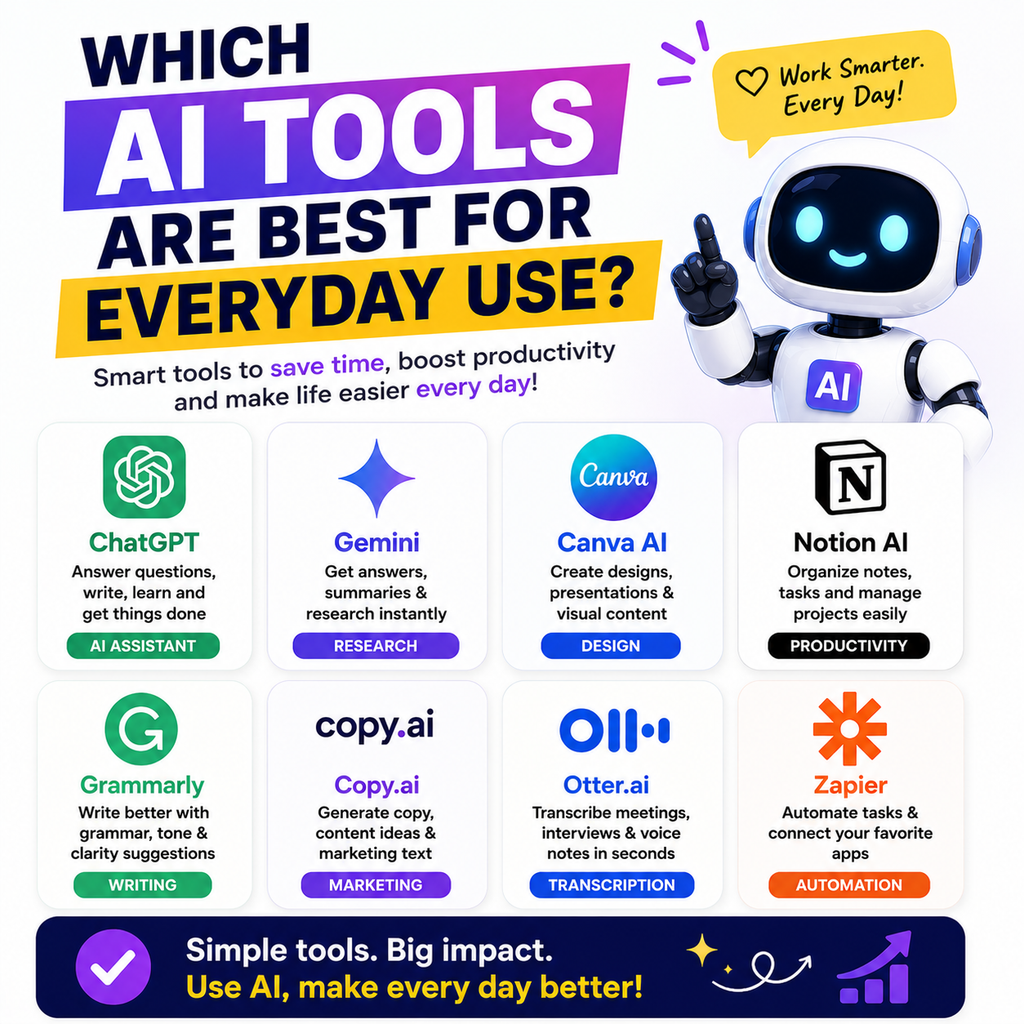
For most users, starting with a small collection of reliable AI tools is more useful than signing up for every new platform. ChatGPT, Claude, Gemini, Perplexity, and Canva AI each offer different strengths for everyday tasks.
What Are the Best AI Tools for Everyday Use?
Here are some of the best options for different daily tasks:
- ChatGPT – Best all-around AI assistant
- Claude – Best for writing and long documents
- Gemini – Best for Google users
- Perplexity – Best for AI-powered research
- Canva AI – Best for everyday design and visual content
- Microsoft Copilot – Useful for Microsoft ecosystem users
The right choice depends on your workflow rather than simply choosing the most popular AI tool.
Why AI Tools Are Useful in Everyday Life
AI tools can reduce the time spent on repetitive tasks and help users get started when they do not know where to begin.
You can use AI for:
- Writing emails and messages
- Creating to-do lists
- Summarizing long content
- Researching topics
- Brainstorming ideas
- Planning trips and schedules
- Improving writing
- Creating social media content
- Learning new subjects
- Generating images and designs
- Organizing work
The biggest advantage is flexibility. A good AI assistant can support multiple tasks from a single conversation.
ChatGPT: Best AI Tool for Everyday Tasks
ChatGPT is one of the most versatile AI tools for everyday use.
It can help with writing, brainstorming, learning, planning, summarization, data analysis, creative work, and many other tasks.
What Can You Use ChatGPT For?
You can ask ChatGPT to:
- Draft professional emails
- Rewrite difficult text
- Create daily plans
- Generate content ideas
- Explain complex topics
- Summarize documents
- Help with brainstorming
- Create checklists
- Improve social media captions
- Assist with creative projects
ChatGPT is a strong choice for users who want one flexible AI assistant for a wide variety of everyday tasks. Recent comparisons commonly position it as a broad, general-purpose AI workspace.
Who Should Use ChatGPT?
ChatGPT is suitable for:
- Students
- Professionals
- Freelancers
- Content creators
- Small business owners
- Digital marketers
- Everyday users
If you want to start with just one AI tool, a general-purpose assistant like ChatGPT is often the simplest option.
Claude: Best AI Tool for Writing and Long Documents
Claude is particularly useful for people who regularly work with detailed writing and long documents.
It can help users review content, improve clarity, brainstorm ideas, and analyze lengthy information.
What Makes Claude Useful for Everyday Work?
Claude can be helpful when you need to:
- Improve articles and blog posts
- Review long documents
- Rewrite content naturally
- Brainstorm detailed ideas
- Analyze uploaded information
- Work through complex writing tasks
Its strengths make it a useful option for writers, professionals, researchers, and users who frequently work with substantial amounts of text.
Who Should Choose Claude?
Claude may be a good choice if your everyday work involves:
- Content writing
- Document analysis
- Business communication
- Research notes
- Long-form content
- Coding and technical projects
Gemini: Best AI Tool for Google Users
Google Gemini can be especially useful for people who already use Google products regularly.
Its connection with Google’s ecosystem makes it convenient for users working with tools such as Gmail, Google Docs, and other Google services.
How Gemini Helps With Daily Productivity
Gemini can support tasks such as:
- Writing and editing content
- Brainstorming ideas
- Research assistance
- Summarizing information
- Planning tasks
- Working with Google-based workflows
Its ecosystem integration is one of the main reasons many Google users consider it for everyday productivity.
Who Should Use Gemini?
Gemini is worth considering if you:
- Use Google services every day
- Work frequently in Google Workspace
- Use Android devices
- Want AI integrated into an existing workflow
Perplexity: Best AI Tool for Everyday Research
Perplexity is useful when you need to research a topic and want to explore supporting sources.
Instead of using AI only for conversation, users can use Perplexity as a research-focused answer engine.
What Can You Use Perplexity For?
Perplexity can help with:
- Researching current topics
- Finding source-backed information
- Comparing products and services
- Exploring unfamiliar subjects
- Gathering information quickly
- Starting deeper research
This makes it particularly useful when accuracy and source checking are important.
Important Tip When Using AI for Research
AI-generated information should not always be accepted without verification.
For important decisions, professional work, health, legal matters, or financial topics, check reliable primary sources and expert guidance.
Canva AI: Best AI Tool for Everyday Design
Canva is a useful option for people who regularly create visual content.
Its AI-powered features can help speed up the design process for users without advanced graphic design skills.
What Can You Create With Canva AI?
You can use it for:
- Social media graphics
- Presentations
- Posters
- Marketing visuals
- Simple videos
- Business documents
- Image generation and editing
Canva is particularly useful when your everyday tasks involve both content and visual communication.
Who Should Use Canva AI?
It can be a practical choice for:
- Content creators
- Students
- Digital marketers
- Small businesses
- Freelancers
- Social media managers
Microsoft Copilot: Useful for Microsoft Users
Microsoft Copilot is worth exploring if much of your work happens inside Microsoft’s ecosystem.
Users who regularly work with Microsoft tools may find AI assistance useful for productivity and workplace tasks.
When Does Copilot Make Sense?
Consider it if you frequently use:
- Microsoft Word
- Excel
- PowerPoint
- Outlook
- Other Microsoft services
The best AI assistant is often the one that fits naturally into the tools you already use.
Comparison of the Best AI Tools for Everyday Use
| AI Tool | Best For | Ideal User |
|---|---|---|
| ChatGPT | General productivity | Most everyday users |
| Claude | Writing and documents | Writers and professionals |
| Gemini | Google-based workflows | Google users |
| Perplexity | Research | Students and researchers |
| Canva AI | Visual content | Creators and marketers |
| Microsoft Copilot | Microsoft workflows | Office users |
Different tools perform best in different workflows, which is why many comparisons recommend choosing AI by task rather than expecting one platform to excel at everything.
How to Choose the Best AI Tool for Your Daily Needs
Before choosing an AI tool, ask yourself what you do most often.
Choose an AI Tool Based on Your Main Task
Need help with general tasks, consider ChatGPT.
Spend more time writing and working with long documents, Claude may be useful.
Work happens inside Google’s ecosystem, Gemini can be a natural choice.
Regularly need research with sources, consider Perplexity.
If you create visual content, Canva AI may save time.
Consider Free and Paid Plans
Many popular AI tools offer free access with certain limits.
Before paying for a subscription, try the free version and determine whether the tool genuinely improves your workflow.
A paid plan makes more sense when AI saves enough time to justify the cost.
Best Everyday AI Tool Combinations
You do not necessarily need five or six AI subscriptions.
A simple AI stack can often cover most daily needs.
For General Users
A practical combination could be:
- ChatGPT for everyday assistance
- Perplexity for research
- Canva for visual content
For Content Creators
Consider using:
- ChatGPT for ideas and content planning
- Claude for detailed writing and editing
- Canva AI for graphics and social media visuals
For Students
A useful combination may include:
- ChatGPT for explanations and study support
- Gemini for productivity
- Perplexity for research and source discovery
Always review AI-generated information before submitting academic or professional work.
For Digital Marketers
Digital marketers may benefit from:
- ChatGPT for brainstorming and content tasks
- Claude for long-form content
- Gemini for workflow support
- Perplexity for research
- Canva AI for creative assets
Using specialized tools for specific tasks can often be more effective than relying on one platform for everything.
Everyday Ways to Get More Value From AI Tools
The quality of your results often depends on how clearly you ask for help.
Give AI Clear Instructions
Instead of writing:
“Write something about marketing.”
Try:
“Write a beginner-friendly 500-word article about social media marketing for small businesses. Use simple language and include practical examples.”
Clear instructions usually produce more useful results.
Provide Context
Tell the AI:
- Who the content is for
- What you want to achieve
- The preferred tone
- The desired length
- Any important details
Context helps the AI produce a more relevant response.
Review Every Important Output
AI can make mistakes.
Always review important:
- Facts
- Statistics
- Names
- Links
- Calculations
- Professional advice
Think of AI as an assistant that can speed up your work, not as a replacement for human judgment.
Are AI Tools Worth Using Every Day?
Yes, AI tools can be valuable for everyday use when they solve real problems and save time.
The best approach is to start with one or two tools rather than trying everything at once.
For example, you could use one AI assistant for writing and productivity, then add a research or design tool only when needed.
This approach keeps your workflow simple and helps you understand which tools provide genuine value.
Frequently Asked Questions About AI Tools for Everyday Use
What is the best AI tool for everyday use?
ChatGPT is a strong general-purpose choice because it can support writing, brainstorming, planning, learning, and many other everyday tasks. However, the best option depends on your workflow.
Which AI tool is best for beginners?
Beginners should start with an easy-to-use general AI assistant such as ChatGPT or Gemini. Focus on learning how to write clear prompts before adding more specialized tools.
Is Claude better than ChatGPT?
Neither tool is better for every task. ChatGPT is widely used as a versatile general-purpose assistant, while Claude is often preferred for detailed writing and long-document work.
Which AI tool is best for research?
Perplexity is a useful option for research because it focuses on helping users explore information alongside sources. Important information should still be verified independently.
Can I use AI tools for free?
Many AI platforms offer free versions, although features and usage limits vary. Start with free access and upgrade only if the additional features are useful for your regular workflow.
Do I need multiple AI tools?
Not necessarily. Most beginners can start with one general-purpose AI assistant. You can add specialized tools later for research, design, writing, or other specific needs.
Final Thoughts: Which AI Tool Should You Choose?
The best AI tools for everyday use are the ones that make your daily tasks easier without making your workflow more complicated.
For most people, ChatGPT is a practical starting point because of its broad range of uses. Claude is a strong option for writing and detailed documents. Gemini works well for people who rely heavily on Google’s ecosystem, while Perplexity is useful for research and source discovery. Canva AI can help users create visual content more efficiently.
Start with the tool that matches your biggest daily need. As you become more comfortable with AI, you can build a simple toolkit around the tasks you perform most often. The goal is not to use every AI tool available. The goal is to find the few tools that genuinely help you work smarter, create faster, and save time.