Prompts for YouTube Scripts
Writing a YouTube script can take a lot of time. You may already know your topic, but turning that idea into a strong hook, clear structure, useful examples, natural transitions, and a good ending is often the hardest part. That is where Google Gemini can help. Gemini can assist with YouTube script ideas, outlines, hooks, full drafts, rewrites, chapter structures, examples, calls to action, and content repurposing.
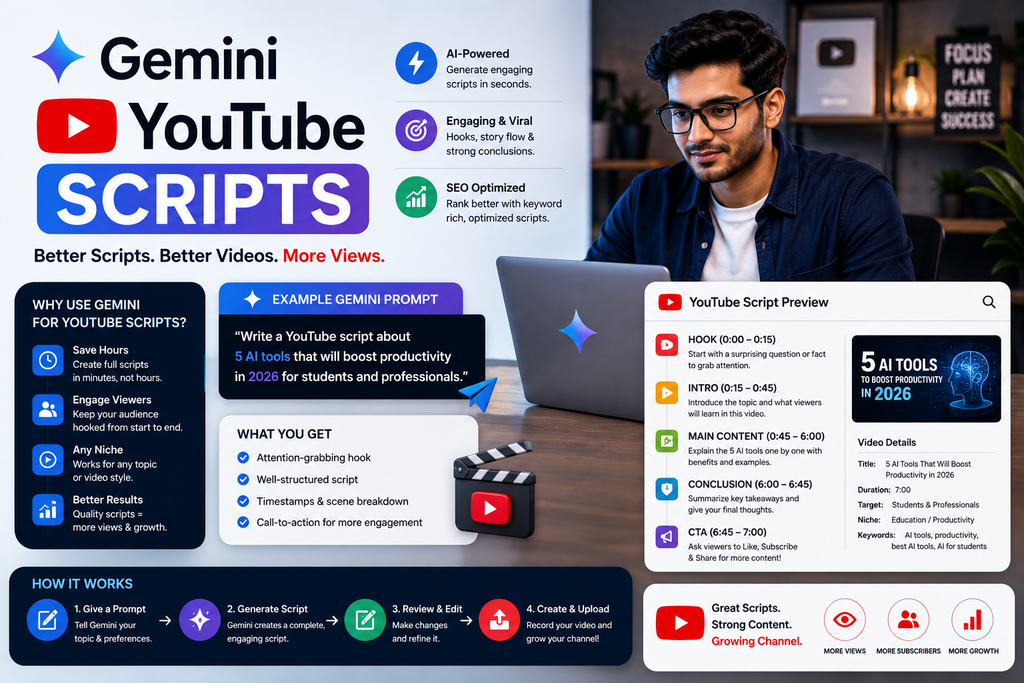
In this guide, you’ll learn how to use Gemini for YouTube scripts step by step, with practical prompts, examples, workflows, common mistakes, and tips for making AI-assisted scripts sound more natural.
Can Gemini Write YouTube Scripts?
Yes. Gemini can help write YouTube scripts when you provide clear information about your topic, target audience, video goal, length, tone, and preferred structure.
For example:
Act as an experienced YouTube scriptwriter. Create a 6-minute YouTube script about [TOPIC] for [AUDIENCE]. Start with a strong but accurate hook, explain the topic in clear sections, include practical examples, avoid unnecessary filler, and finish with a natural CTA. Keep the language conversational and easy to speak aloud.
The more context you provide, the more focused the draft can become.
What Is Gemini for YouTube Script Writing?
Using Gemini for YouTube scripts means using it as an assistant during the planning, drafting, and editing process.
You can use Gemini to help with:
- YouTube video ideas
- Video hooks
- Script outlines
- Full scripts
- Educational videos
- Tutorials
- Explainer videos
- Comparison videos
- Reviews
- List-style videos
- Case studies
- Storytelling
- Intros and outros
- Calls to action
- Video chapters
- Script rewrites
- Content repurposing
Gemini can help you get from a blank page to a useful first draft faster.
But it should not replace your own experience, expertise, research, or judgment.
Why Use Gemini for YouTube Scripts?
YouTube scripts need structure.
A useful script often follows a sequence like:
Hook → Context → Main Value → Examples → Summary → CTA
Without structure, even good information can feel difficult to follow.
Gemini can help you organize ideas into a clearer sequence.
For example, if your topic is:
How to Use AI for Content Creation
Gemini could help you structure the video around:
- What AI can help with
- Where AI is useful
- Where AI can make mistakes
- A practical workflow
- Example prompts
- Common mistakes
- Final takeaway
This helps you think about the viewer journey, not just the words on the page.
How to Use Gemini for YouTube Scripts Step by Step
Step 1: Choose One Clear Video Topic
Start with a focused topic.
Weak topic:
AI tools
Better topic:
How small business owners can use AI for weekly content planning
A focused topic gives Gemini a clearer direction.
Step 2: Define Your Target Audience
Tell Gemini who the video is for.
For example:
- Beginners
- Small business owners
- Freelancers
- Marketers
- Students
- Developers
- Content creators
- Job seekers
Compare:
Write a video about SEO.
With:
Write a beginner-friendly YouTube video about SEO for local business owners who have never done keyword research before.
The second version is much more specific.
Step 3: Define the Video Goal
Ask yourself what you want viewers to achieve.
Your goal may be to:
- Educate
- Explain
- Demonstrate
- Compare
- Review
- Entertain
- Build trust
- Generate leads
- Encourage viewers to try something
- Direct viewers to another video
Tell Gemini the goal before asking for a complete script.
Step 4: Choose the Video Length
Video length changes the amount of detail the script should include.
For example:
- 2 minutes: quick explanation
- 5 minutes: focused tutorial
- 8–10 minutes: deeper guide
- 15+ minutes: comprehensive walkthrough
You can say:
Create a script suitable for approximately 7 minutes of spoken content.
Avoid treating word count as an exact guarantee because speaking speed varies.
Step 5: Ask Gemini for an Outline First
Before generating a full script, ask for structure.
Use:
Create a detailed YouTube script outline for a video about [TOPIC]. The audience is [AUDIENCE], and the video should be approximately [LENGTH]. Include a hook, introduction, main sections, examples, transitions, summary, and CTA.
Review the outline.
Then decide whether anything should be added, removed, or reordered.
Step 6: Generate the Full Script
Once the outline looks good, ask Gemini to expand it.
For example:
Turn this outline into a complete YouTube script. Use conversational spoken language, short sentences, clear transitions, and practical examples. Avoid filler, hype, and unsupported claims.
This usually produces a better result than asking for everything in one vague prompt.
Step 7: Add Your Own Experience
Before recording, add your own:
- Examples
- Demonstrations
- Screenshots
- Stories
- Results
- Opinions
- Lessons
- Mistakes
- Observations
- Case studies
This is where your script becomes more distinctive.
Step 8: Fact-Check the Script
AI can produce inaccurate or outdated information.
Before publishing, verify:
- Statistics
- Dates
- Product features
- Prices
- Technical claims
- Company information
- Quotes
- Research findings
- Tool capabilities
If you cannot verify a claim, remove it or rewrite it more cautiously.
Best Gemini Prompt Formula for YouTube Scripts
A strong prompt can follow this formula:
Role + Topic + Audience + Goal + Length + Tone + Structure + Constraints
For example:
Act as an experienced YouTube scriptwriter.
Topic: [TOPIC]
Audience: [AUDIENCE]
Goal: [GOAL]
Length: [LENGTH]
Tone: [TONE]
Structure: Hook, introduction, main sections, examples, summary, CTA.
Keep the language conversational and easy to speak. Avoid filler, clickbait, fake statistics, exaggerated claims, and unnecessary repetition.
This gives Gemini much more useful context.
30+ Gemini Prompts for YouTube Scripts
1. Complete YouTube Script Prompt
Write a complete YouTube script about [TOPIC] for [AUDIENCE]. The video should be approximately [LENGTH]. Include a hook, introduction, main sections, examples, summary, and CTA.
2. YouTube Script Outline
Create a detailed YouTube script outline about [TOPIC]. Organize the video into logical sections and include the main point each section should communicate.
3. Beginner-Friendly YouTube Script
Write a beginner-friendly YouTube script explaining [TOPIC]. Assume the viewer has little prior knowledge. Define important terms and use simple examples.
4. Educational YouTube Script
Create an educational YouTube script about [TOPIC]. Each section should answer one important question and end with a clear takeaway.
5. How-To YouTube Script
Write a step-by-step YouTube tutorial explaining how to [TASK]. Include preparation, steps, common mistakes, troubleshooting tips, and a final summary.
6. Search-Intent YouTube Script
Write a YouTube script that directly answers the search query “[QUESTION].” Give the short answer near the beginning, then explain the topic in more depth.
7. List-Style Video Script
Create a YouTube script about “[NUMBER] [TIPS/TOOLS/MISTAKES] for [TOPIC].” Explain each item clearly and use smooth transitions.
8. Comparison Video Script
Write a balanced comparison video for [OPTION A] vs [OPTION B]. Compare features, strengths, limitations, use cases, and who each option may suit.
9. Product Review Script
Create a YouTube review script for [PRODUCT]. Cover what it is, main features, strengths, limitations, ideal users, and key considerations. Avoid unsupported claims.
10. Tool Tutorial Script
Write a YouTube tutorial showing beginners how to use [TOOL] for [TASK]. Explain each step clearly and include likely beginner mistakes.
11. FAQ Video Script
Create a YouTube script answering 10 common questions about [TOPIC]. Give a direct answer to each question before adding explanation.
12. Mistakes Video Script
Write a YouTube script about seven common mistakes people make with [TOPIC]. Explain the mistake, why it happens, and what to do instead.
13. Myth-Busting Script
Create a YouTube script covering five common myths about [TOPIC]. Explain what people often believe, what is more accurate, and why the distinction matters.
14. Case Study Script
Turn the following real case study into a YouTube script: [DETAILS]. Use the structure situation, problem, approach, result, lesson. Do not invent facts.
15. Storytelling Script
Turn this real experience into a YouTube story: [EXPERIENCE]. Structure it as situation, challenge, turning point, outcome, and lesson.
Gemini Prompts for YouTube Hooks
16. General Hook Generator
Generate 20 YouTube hooks about [TOPIC]. Use a mix of questions, problems, direct answers, mistakes, surprising observations, and benefit-focused openings. Avoid misleading clickbait.
17. Problem-Based Hooks
Generate 10 YouTube opening lines that address this problem: [PROBLEM]. Make the hook clear, specific, and relevant to [AUDIENCE].
18. Curiosity Hooks
Generate 10 curiosity-driven hooks for a YouTube video about [TOPIC]. Create interest without hiding essential context or making exaggerated promises.
19. Tutorial Hooks
Generate 10 hook options for a tutorial showing viewers how to [TASK]. Make it clear what they will learn.
20. Comparison Hooks
Generate 10 opening hooks for a video comparing [OPTION A] and [OPTION B]. Avoid declaring a winner before the comparison.
Gemini Prompts for YouTube Introductions and Outros
21. YouTube Introduction
Write five introduction options for a YouTube video about [TOPIC]. Quickly explain what viewers will learn, who the video is for, and why the topic matters.
22. Shorter Introduction
Rewrite this YouTube introduction to reach the main value faster. Remove filler, greetings, and unnecessary background while preserving context.
[INTRO]
23. YouTube Outro
Generate 10 natural YouTube outro options for a video about [TOPIC]. Include variations for subscribing, watching another video, leaving a comment, and trying a practical step.
24. Next-Video CTA
Write five outro transitions that naturally direct viewers from a video about [CURRENT TOPIC] to another video about [NEXT TOPIC].
Gemini Prompts for Better YouTube Script Structure
25. Improve Script Flow
Review this YouTube script for structure and flow. Identify sections that feel out of order, repetitive, or disconnected and suggest a better sequence.
[SCRIPT]
26. Improve Transitions
Add natural spoken transitions between the main sections of this YouTube script. Keep them short and conversational.
[SCRIPT]
27. Improve Pacing
Review this script for pacing. Identify sections that are too slow, too dense, or repetitive and suggest where to shorten or add examples.
[SCRIPT]
28. Simplify the Script
Rewrite this YouTube script for a beginner audience. Simplify complicated explanations while preserving important nuance.
[SCRIPT]
29. Make the Script More Conversational
Rewrite this YouTube script so it sounds natural when spoken aloud. Use shorter sentences, contractions where appropriate, and conversational transitions.
[SCRIPT]
30. Remove Filler
Remove unnecessary filler, repetition, clichés, long introductions, and generic motivational language from this YouTube script.
[SCRIPT]
Gemini Prompts for YouTube Visuals
31. B-Roll Suggestions
Review this YouTube script and suggest practical B-roll ideas for each section. Prioritize visuals that a solo creator could realistically produce.
[SCRIPT]
32. Screen Recording Suggestions
Identify where screen recordings would improve this YouTube tutorial and explain what should be shown on screen at each point.
[SCRIPT]
33. On-Screen Text
Create concise on-screen text suggestions for the key moments in this YouTube script.
[SCRIPT]
34. Chapter Ideas
Create clear YouTube chapter titles for this script. Each chapter title should accurately describe the section.
[SCRIPT]
Best All-in-One Gemini Prompt for YouTube Scripts
Save this reusable prompt:
Act as an experienced YouTube content strategist and scriptwriter.
Video topic: [TOPIC]
Target audience: [AUDIENCE]
Audience level: [BEGINNER / INTERMEDIATE / ADVANCED]
Video goal: [GOAL]
Approximate length: [LENGTH]
Tone: [TONE]
Create a complete YouTube script with:
- Five hook options
- Recommended content angle
- Clear introduction
- Main sections in logical order
- Practical examples
- Smooth transitions
- B-roll or screen-recording suggestions
- On-screen text suggestions
- Summary
- Natural CTA
- Five title ideas
- Three follow-up video ideas
Use natural spoken language. Avoid filler, clichés, fake statistics, unsupported claims, exaggerated promises, and repetitive phrasing. Clearly mark information that should be verified before publishing.
Example: Using Gemini to Write a YouTube Script
Suppose your video topic is:
How to Use Gemini for Blog Writing
A weak prompt would be:
Write a YouTube video about Gemini and blogs.
A stronger prompt would be:
Create a 6-minute YouTube tutorial for beginner bloggers explaining how to use Gemini during the blog-writing process. Cover topic brainstorming, outlines, first drafts, rewriting, fact-checking, and adding original experience. Include one example prompt for each stage. Use a conversational tone and avoid suggesting that users publish AI output without review.
Now Gemini knows:
- The topic
- The audience
- The format
- The length
- The content sections
- The desired tone
- The limitations to mention
A possible structure might be:
Hook
“Gemini can help you write a blog faster—but asking it to write the whole article in one prompt is usually not the best workflow.”
Section 1: Start With the Topic
Show how to use Gemini for brainstorming.
Section 2: Build the Outline
Generate a logical structure before drafting.
Section 3: Draft One Section at a Time
Keep the content focused.
Section 4: Add Your Own Experience
Add examples, screenshots, opinions, and first-hand observations.
Section 5: Verify Claims
Check factual information before publishing.
Conclusion
Use AI as a writing assistant rather than an automatic publisher.
This is much more useful than a generic script.
How to Make Gemini YouTube Scripts Sound Human
AI-generated scripts can sometimes sound too polished or repetitive.
Typical phrases may include:
- “In today’s fast-paced digital world”
- “Unlock the power of”
- “Game changer”
- “Revolutionize your workflow”
- “Let’s dive in”
- “Without further ado”
You do not need to ban every phrase, but overusing them can make a script sound generic.
Try:
Rewrite this script so it sounds like an experienced creator explaining the topic directly to one viewer. Use simple language, specific examples, natural transitions, and varied sentence lengths. Remove hype, clichés, robotic phrases, and unnecessary filler.
Then read the script aloud.
A good rule:
If you would not naturally say it, do not record it.
Write YouTube Scripts for Speaking, Not Reading
A blog post and a YouTube script are not the same thing.
Written content can use longer sentences.
Spoken content usually works better with:
- Shorter sentences
- Clear transitions
- Simple vocabulary
- Repetition only when useful
- Examples
- Natural pauses
- Direct language
For example:
Article Style
The effectiveness of generative AI in content creation depends significantly on the amount of contextual information supplied by the user.
Spoken Style
Better context usually gives you better AI output. If your prompt is vague, the answer may be vague too.
The second version is much easier to say on camera.
How Long Should a Gemini YouTube Script Be?
There is no perfect script length for every video.
The right length depends on:
- Topic complexity
- Audience knowledge
- Video format
- Speaking speed
- Number of examples
- Demonstrations
- Editing style
Instead of asking Gemini for an exact word count only, describe the intended video duration and depth.
For example:
Create a focused script suitable for approximately 5–7 minutes of spoken content. Prioritize clarity over filling time.
That encourages a more useful draft.
How to Use Gemini for YouTube SEO Content Planning
Gemini can help you organize content around search-focused questions.
For example:
My main YouTube topic is [TOPIC]. Generate 20 specific questions beginners may search for about this topic. Group them into beginner questions, how-to questions, comparisons, mistakes, and troubleshooting topics.
You can then turn individual questions into videos.
For example, a main topic like:
Gemini
could become:
- What Is Gemini?
- How to Use Gemini for Beginners
- Gemini for YouTube Scripts
- Gemini Prompts for Reels
- Gemini for Research
- Gemini vs ChatGPT
- Common Gemini Prompting Mistakes
- How to Improve Gemini Responses
This creates a more connected content strategy.
Use Gemini to Turn One YouTube Video Into Multiple Pieces of Content
A long-form YouTube script can become more than one video.
You can repurpose it into:
- YouTube Shorts
- Instagram Reels
- LinkedIn posts
- Blog posts
- Email newsletters
- Social captions
- FAQ content
Use:
Analyze this YouTube script and identify 10 standalone ideas that could become short-form videos, LinkedIn posts, or blog sections. Preserve the original meaning and do not invent new facts.
[SCRIPT]
Repurposing can help you get more value from a strong original idea.
Gemini for YouTube Shorts From a Long Script
After creating a long-form video, ask:
Analyze this YouTube script and find five sections that could become standalone YouTube Shorts. For each one, create a 30–60 second script with a hook, one core idea, and a CTA. Do not depend on viewers having watched the long video.
[SCRIPT]
This creates independent short-form content rather than random excerpts.
Gemini for Different Types of YouTube Channels
Educational Channels
Create a YouTube script teaching [TOPIC] to [AUDIENCE]. Define key terms, use examples, summarize each major section, and finish with practical next steps.
Technology Channels
Create a YouTube script explaining [TECH TOPIC]. Cover what it is, how it works, practical use cases, limitations, and important considerations. Flag technical claims that should be verified.
Business Channels
Write a YouTube script about [BUSINESS TOPIC] for [AUDIENCE]. Focus on practical decision-making, examples, trade-offs, and realistic outcomes.
Marketing Channels
Create a YouTube tutorial about [MARKETING TOPIC]. Include strategy, execution steps, examples, mistakes, and how viewers can evaluate results.
Career Channels
Write an educational YouTube script about [CAREER TOPIC]. Provide practical general guidance without guaranteeing employment, salary, or career outcomes.
Personal Brand Channels
Create a YouTube script based on my real experience with [TOPIC]. Use the information I provide as the source material and do not invent personal stories.
Common Mistakes When Using Gemini for YouTube Scripts
1. Starting With a Vague Prompt
“Write a YouTube script” gives Gemini too little information.
Define your audience, topic, goal, and format.
2. Skipping the Outline
A full script generated immediately may have weak structure.
Create the outline first.
3. Copying the First Draft
AI-generated scripts should usually be edited.
Add your own voice and examples.
4. Trusting Every Fact
Verify factual claims before recording.
5. Writing a Blog Instead of a Script
Video language should sound natural aloud.
6. Using Overly Dramatic Hooks
A hook should create interest without misleading viewers.
7. Adding Too Many Ideas
One focused video is often easier to follow than a script trying to answer everything.
8. Ignoring Viewer Level
A beginner video should not assume advanced knowledge.
9. Ignoring Visuals
A YouTube script should consider what viewers will see, not only what they will hear.
10. Removing Your Own Perspective
Your experience and judgment can be the most valuable part of the video.
Frequently Asked Questions
Can Gemini write YouTube scripts?
Yes. Gemini can help create YouTube script outlines, hooks, introductions, full drafts, examples, transitions, outros, CTAs, and visual suggestions.
How do I use Gemini for YouTube scripts?
Give Gemini your topic, audience, video goal, approximate length, tone, and preferred structure. Start with an outline, then ask it to expand the approved structure into a full script.
Is Gemini good for YouTube scripts?
Gemini can be useful for brainstorming, structuring, drafting, rewriting, and repurposing. The final quality still depends on your instructions, fact-checking, examples, and editing.
What should I include in a Gemini YouTube script prompt?
Include the topic, audience, audience level, video goal, approximate length, tone, structure, required examples, and any constraints.
Can Gemini create YouTube hooks?
Yes. You can ask Gemini for multiple hook styles based on the same topic, including problem, question, tutorial, comparison, and direct-answer hooks.
Can Gemini create YouTube video outlines?
Yes. Creating an outline before drafting the full script is often a useful workflow because it lets you review the structure first.
Can Gemini create scripts for YouTube Shorts?
Yes. Ask it to focus on one idea and specify a 30–60 second duration.
Can Gemini repurpose a YouTube script?
Yes. You can turn a long YouTube script into Shorts, Reels, LinkedIn posts, blog sections, or newsletters.
Can Gemini make a YouTube script SEO-friendly?
Gemini can help organize scripts around specific viewer questions and search intent, but it cannot guarantee rankings. Focus on accurately answering the target question and creating useful content for viewers.
Should I publish a Gemini script exactly as generated?
Usually, no. Review the draft for accuracy, natural language, pacing, relevance, originality, and your own voice before recording.
Gemini YouTube Script Checklist
Before recording, check whether your script:
- Has a clear target viewer
- Answers one main question
- Starts with an accurate hook
- Reaches the useful content quickly
- Uses clear sections
- Includes practical examples
- Sounds natural when spoken
- Avoids unnecessary repetition
- Includes accurate factual claims
- Includes useful visuals
- Has a natural CTA
- Reflects your own experience or perspective where appropriate
Final Thoughts
Gemini can be a useful YouTube scripting assistant when you use it with a clear process.
A strong workflow looks like this:
Topic → Audience → Outline → Script → Human Edit → Examples → Fact Check → Visual Plan → Record
Use Gemini to help with:
Ideas → Hooks → Structure → Drafting → Rewriting → Repurposing
But keep your own knowledge and personality at the center.
The best AI-assisted script should still feel like a video you created.
The goal is not to let Gemini replace your creative process.
The goal is to use Gemini to make that process faster, clearer, and more organized.
About the Author
Gurudeep Singh writes about artificial intelligence, Gemini, ChatGPT, Claude, AI prompts, content creation, and practical AI workflows at KeyArtificial.