Automate Work and Get More Done
Business productivity is no longer simply about working longer hours.In 2026, businesses are looking for smarter ways to complete repetitive tasks, organize information, communicate with customers, manage projects, analyze data, and make better decisions.
This is where AI productivity tools can make a significant difference.Artificial intelligence can help businesses automate repetitive processes, generate content, summarize information, analyze data, support employees, improve customer service, and streamline everyday workflows.
Small business owner, AI may mean spending less time on administration and more time serving customers.Marketing team, it can mean creating campaigns faster.Sales team, it can mean researching prospects and preparing outreach more efficiently.
And managers, it can mean turning meetings and business data into useful summaries and actionable insights.But AI does not automatically make a business productive.
The real value comes from identifying the right tasks, choosing appropriate AI tools, integrating them into existing workflows, and keeping humans involved where judgment is important.
This guide explains how AI tools can improve business productivity, where they provide the most value, and how businesses can implement AI without creating unnecessary complexity.
How Can AI Tools Improve Business Productivity?
AI tools can improve business productivity by automating repetitive tasks, reducing manual work, speeding up research, improving communication, organizing information, assisting employees, analyzing data, and streamlining workflows.
The biggest productivity improvements usually come from tasks that are:
- Repetitive
- Time-consuming
- Rule-based
- Data-heavy
- Frequently performed
- Easy to measure
For example, AI can help a business turn meeting recordings into summaries, draft emails, classify customer requests, generate marketing content, analyze spreadsheets, organize projects, and automate data transfers between business applications.
The goal is not to replace every human task with AI.
The goal is to allow employees to spend more time on high-value work that requires creativity, judgment, relationships, and strategic thinking.
What Is AI-Powered Business Productivity?
AI-powered business productivity means using artificial intelligence to help employees and business owners complete work more efficiently.
Traditional productivity software generally helps people organize work.
AI productivity software can go one step further by helping perform parts of the work.
For example:
Traditional Productivity
A manager writes meeting notes manually.
AI-Assisted Productivity
AI creates a meeting transcript, summarizes the main points, identifies decisions, and creates potential action items for review.
Another example:
Traditional Marketing Workflow
A marketer researches a topic, creates an outline, writes content, edits it, creates social posts, and prepares an email campaign manually.
AI-Assisted Marketing Workflow
AI can help with research, brainstorming, outlining, drafting, repurposing, and editing while the marketer reviews and improves the final output.
This difference is what makes modern AI tools particularly valuable for productivity.
Why Is AI Important for Business Productivity in 2026?
Businesses are dealing with increasing amounts of information and increasingly complex workflows.
Employees may need to manage:
- Emails
- Customer messages
- Documents
- Meetings
- CRM records
- Social media
- Sales leads
- Financial information
- Marketing campaigns
- Project tasks
- Internal communication
AI can help reduce the amount of manual work required to manage these activities.
AI Can Work Across Multiple Business Functions
It productivity improvements are not limited to one department.
AI can assist:
- Business owners
- Sales teams
- Marketing teams
- Customer service teams
- HR departments
- Finance teams
- Operations teams
- Project managers
- Content teams
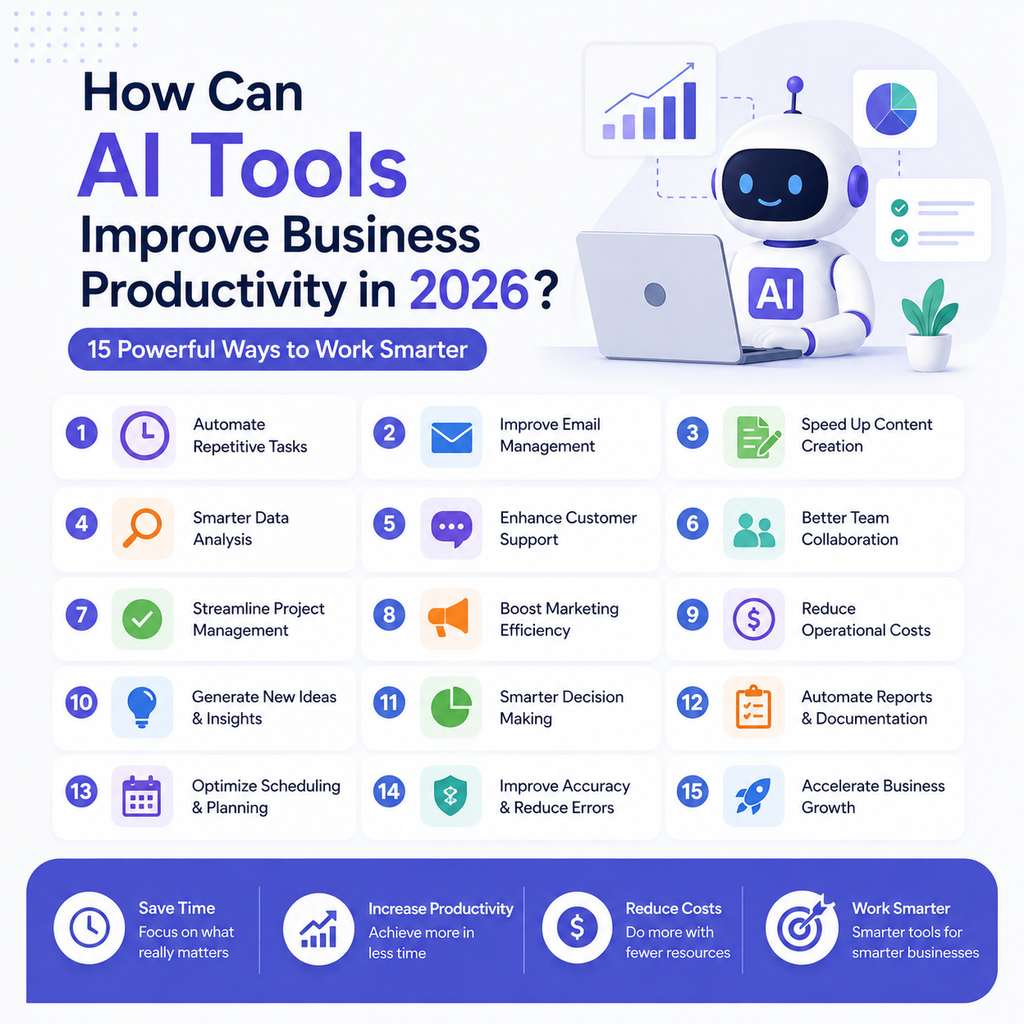
15 Ways AI Tools Can Improve Business Productivity
1. Automate Repetitive Tasks
One of the biggest advantages of AI is reducing repetitive work.
Employees often spend hours performing tasks that follow predictable patterns.
AI and automation tools can help handle activities such as:
- Data entry
- Email categorization
- Document processing
- Meeting summaries
- Lead qualification
- Report generation
- Customer queries
- File organization
Example
A new lead submits a form.
Instead of an employee manually entering the information into several systems, an automated workflow can potentially:
Form submission → AI qualification → CRM update → notification → follow-up task
This reduces manual steps and allows employees to focus on higher-value work.
2. Save Time on Email and Communication
Email can consume a large portion of an employee’s working day.
AI writing assistants can help users draft, summarize, rewrite, and organize communications.
How AI Can Help With Emails
AI can assist with:
- Drafting responses
- Summarizing long email threads
- Changing tone
- Improving clarity
- Creating follow-up messages
- Translating communications
- Extracting action items
Why It Matters
Instead of starting every email from scratch, employees can use AI to create an initial draft and then add their personal judgment and context.
3. Make Business Research Faster
Research is important for almost every business.
Employees may research:
- Competitors
- Customers
- Products
- Industries
- Markets
- Trends
- Suppliers
- Keywords
- Business opportunities
AI research tools can help organize large amounts of information and provide summaries.
Important Consideration
AI-generated research should not automatically be treated as fact.
For important business decisions, verify critical information using reliable and primary sources.
4. Improve Meeting Productivity
Meetings can generate valuable information, but manually documenting them takes time.
AI meeting assistants can help with:
- Transcription
- Summaries
- Key decisions
- Action items
- Speaker identification
- Searchable meeting records
Example Workflow
Meeting → AI transcription → summary → action items → assigned tasks
This can make it easier for employees to remember decisions and follow through on responsibilities.
5. Speed Up Content Creation
Businesses need content for:
- Websites
- Blogs
- Social media
- Advertisements
- Product pages
- Presentations
AI can help generate first drafts and creative ideas much faster.
AI Content Workflow
A business could use AI to:
- Research a topic
- Generate content ideas
- Create an outline
- Draft the content
- Improve readability
- Create social media variations
- Create email copy
Human review remains important because high-quality business content requires accuracy, originality, expertise, and brand understanding.
6. Improve Customer Service Productivity
Customer support teams frequently answer the same questions repeatedly.
AI can help automate common customer requests.
Common AI Customer Service Tasks
- Answering FAQs
- Tracking requests
- Categorizing tickets
- Summarizing conversations
- Suggesting responses
- Routing support requests
- Translating messages
Human + AI Customer Service
The best approach is often a combination.
AI handles routine requests → human handles complex problems
This can reduce repetitive workload while preserving human support for situations that require judgment or empathy.
7. Help Sales Teams Work Faster
Salespeople spend significant time researching prospects, writing emails, updating CRM systems, and preparing for meetings.
AI can assist with these activities.
AI Sales Productivity Tasks
- Prospect research
- Lead qualification
- Email drafting
- Follow-up suggestions
- CRM assistance
- Meeting preparation
- Call summaries
- Sales forecasting
Example
A salesperson could use AI to summarize a prospect’s previous interactions before a meeting.
Instead of spending 20 minutes reviewing multiple records, the salesperson may receive a concise summary and spend more time preparing the actual conversation.
8. Improve Marketing Productivity
Marketing involves many repetitive tasks.
AI can help marketing teams produce and analyze campaigns more efficiently.
AI Marketing Tasks
- Content ideas
- Keyword research
- Ad copy
- Social media posts
- Email campaigns
- Audience research
- Competitor analysis
- Content repurposing
- Campaign analysis
Example
One long-form article can become:
- LinkedIn posts
- Instagram captions
- Email content
- Short video ideas
- FAQ answers
- Ad concepts
AI can help with this repurposing process while marketers maintain control over messaging and quality.
9. Analyze Business Data Faster
Businesses generate large amounts of data.
AI can help employees understand data without manually examining every row or document.
AI Data Analysis Can Help With
- Identifying trends
- Finding anomalies
- Summarizing reports
- Comparing performance
- Creating insights
- Supporting forecasting
- Answering questions about datasets
For example, a business owner could ask an AI system to identify which products generated the highest sales growth during a specific period.
The output should still be checked before being used for important financial or strategic decisions.
10. Improve Project Management
Project management involves coordinating people, deadlines, documents, and tasks.
AI can help project managers reduce administrative work.
AI Project Management Tasks
- Create task lists
- Summarize project updates
- Identify overdue tasks
- Generate project documentation
- Create meeting summaries
- Organize information
- Draft status reports
Example
Instead of manually creating a weekly project report, AI can summarize project activity and highlight items that require manager attention.
11. Make Knowledge Management Easier
Businesses accumulate large amounts of information.
Important knowledge can become difficult to find when it is stored across:
- Documents
- Emails
- PDFs
- Spreadsheets
- Websites
- Internal databases
- Knowledge bases
AI-powered search and knowledge-management tools can help employees find relevant information faster.
Why This Matters
An employee should not need to spend 30 minutes searching through folders to find a document that AI-powered enterprise search could locate quickly.
12. Improve Employee Training
AI can help businesses create and deliver training materials.
AI Training Applications
- Create learning materials
- Generate quizzes
- Explain difficult concepts
- Answer employee questions
- Summarize training documents
- Create onboarding resources
AI-Powered Onboarding
A new employee could interact with an internal AI assistant to find information about:
- Company policies
- Procedures
- Tools
- Workflows
- Documentation
Sensitive company information should only be connected to AI systems with appropriate access controls and security measures.
13. Reduce Administrative Work
Business administration contains many tasks that do not directly generate revenue.
AI can help streamline activities such as:
- Document creation
- Scheduling
- Data organization
- Report preparation
- Form processing
- Internal communication
- Information extraction
The Productivity Advantage
When employees spend less time on administrative work, they can devote more time to customers, strategy, innovation, and revenue-generating activities.
14. Improve Decision-Making
AI can help business owners examine information from multiple perspectives.
For example, AI can assist with:
- SWOT analysis
- Competitor comparison
- Scenario planning
- Market research
- Customer feedback analysis
- Business strategy brainstorming
AI Should Support Decisions, Not Replace Judgment
AI can identify patterns and generate options.
The final business decision should remain with the people responsible for the outcome.
This is especially important for legal, financial, employment, security, and other high-impact decisions.
15. Enable Small Teams to Do More
Perhaps the biggest productivity opportunity is helping small teams operate more efficiently.
A five-person company can use AI to support activities that might otherwise require several specialized roles.
For example:
Business owner + AI
→ Content assistance
→ Customer support automation
→ Sales research
→ Email assistance
→ Meeting summaries
→ Data analysis
→ Workflow automation
This does not mean one person can replace an entire organization.
It means a small team can potentially reduce unnecessary administrative workload and focus more heavily on its core business.
Which Business Tasks Should You Automate With AI?
Not every task is suitable for AI automation.
The best candidates usually have several characteristics.
Repetitive Tasks
Tasks performed frequently are strong candidates.
Rule-Based Tasks
If the process follows clear rules, automation may be easier.
High-Volume Tasks
Tasks involving many emails, tickets, leads, or documents can benefit significantly.
Time-Consuming Tasks
If employees spend many hours on a low-value process, AI may provide measurable productivity improvements.
Easily Measurable Tasks
Choose processes where you can compare performance before and after automation.
AI Productivity Examples by Department
Different departments can use AI differently.
Sales
AI can help with prospecting, lead qualification, email drafting, CRM updates, and meeting preparation.
Marketing
AI can assist with content creation, SEO research, campaign planning, advertising, and social media.
Customer Service
AI can answer routine questions, summarize conversations, classify tickets, and assist support agents.
Human Resources
AI can assist with job descriptions, interview preparation, onboarding materials, and employee documentation.
Finance
AI can help organize information, summarize reports, identify patterns, and automate certain workflows.
Operations
AI can assist with documentation, process automation, forecasting, and workflow management.
Management
Business leaders can use AI for research, summaries, planning, brainstorming, and decision support.
Best Types of AI Tools for Business Productivity
You do not necessarily need one AI platform to handle everything.
Different tools are designed for different productivity problems.
AI Assistants
Useful for writing, research, brainstorming, analysis, and everyday work.
AI Automation Platforms
Useful for connecting business applications and automating workflows.
AI Project Management Tools
Useful for tasks, projects, documentation, and team collaboration.
AI Customer Service Tools
Useful for automated customer support and agent assistance.
AI Sales Tools
Useful for prospecting, outreach, CRM, and sales intelligence.
AI Marketing Tools
Useful for content, SEO, advertising, email, and campaign management.
AI Meeting Assistants
Useful for transcription, summaries, and action items.
How AI Improves Employee Productivity Without Replacing Employees
One of the biggest misconceptions about AI is that productivity improvement always means reducing the number of employees.
In many businesses, the better strategy is AI augmentation.
AI handles repetitive work.
Employees handle:
- Strategy
- Creativity
- Relationships
- Negotiation
- Judgment
- Leadership
- Complex problem-solving
Example
Instead of replacing a customer service representative, AI can provide the representative with:
- Customer history
- Suggested response
- Relevant knowledge-base articles
- Conversation summary
The employee then makes the final decision and communicates with the customer.
This can improve both speed and quality.
How to Measure AI Productivity Improvements
Installing an AI tool is not enough.
You need to measure its impact.
Time Saved
Measure how long a task took before and after AI implementation.
Tasks Completed
Track whether employees can complete more work within the same amount of time.
Error Rate
Measure whether AI-assisted processes reduce or increase mistakes.
Employee Productivity
Look at output per employee while also considering quality.
Customer Satisfaction
For customer-facing AI, monitor customer satisfaction and escalation rates.
Revenue Impact
Where possible, connect productivity improvements to:
- Leads
- Sales
- Revenue
- Retention
- Cost savings
AI Productivity ROI Formula
A simple approach is:
AI ROI = (Time savings + cost savings + additional revenue − AI costs) ÷ AI costs × 100
The exact calculation should reflect your business and implementation costs.
How to Implement AI for Business Productivity
Successful AI implementation does not require automating everything on day one.
Step 1: Identify Your Biggest Productivity Problem
Ask:
What takes the most employee time?
What process is repetitive?
Where are customers waiting?
Where does information get lost?
Step 2: Choose One Workflow
Start with a single process.
For example:
Customer inquiry → AI classification → response suggestion → human approval
Step 3: Select the Right AI Tool
Choose software based on your actual workflow rather than popularity.
Step 4: Create Clear Rules
Define:
- What AI can do
- What AI cannot do
- When humans must intervene
- What information AI can access
- How outputs should be reviewed
Step 5: Train Your Team
Employees need to understand how to use AI effectively.
AI literacy is becoming an important business skill.
Step 6: Measure Results
Track productivity before and after implementation.
Step 7: Expand Gradually
Once one workflow produces measurable results, automate another.
Common AI Productivity Mistakes Businesses Should Avoid
Automating the Wrong Process
Do not automate a process simply because you can.
First determine whether the process actually creates value.
Using Too Many AI Tools
A complicated technology stack can create more work instead of reducing it.
Ignoring Human Review
AI-generated information can be incorrect or incomplete.
Poor Data Quality
AI systems are only as useful as the information and context they receive.
No Clear Business Goal
Do not implement AI simply to say that your company uses AI.
Start with a measurable objective.
Forgetting Employee Training
Employees need clear guidance on when and how to use AI.
What Are the Risks of Using AI for Business Productivity?
AI can improve productivity, but businesses should manage its risks.
Incorrect Information
AI can produce inaccurate content or analysis.
Data Privacy
Businesses should carefully consider what customer, employee, financial, or confidential information is shared with AI systems.
Security Risks
AI tools should be evaluated for appropriate security controls and access management.
Over-Reliance on AI
Employees should not blindly accept AI recommendations.
Reduced Human Interaction
Over-automation can make customer and employee experiences feel impersonal.
The solution is not to avoid AI.
The solution is to implement it with appropriate controls, human oversight, and clear objectives.
AI Productivity Strategy for Small Businesses
Small businesses can start with a simple approach.
Start With These Five Areas
1. Email: Use AI to draft and summarize messages.
2. Marketing: Use AI to create content ideas and first drafts.
3. Customer service: Automate common questions.
4. Administration: Automate repetitive data workflows.
5. Meetings: Use AI to summarize discussions and action items.
Simple Small Business AI Workflow
A small business might use:
AI assistant → CRM → automation → email → customer support
The exact tools will depend on the business.
The important thing is to create a connected workflow rather than purchasing unrelated AI products.
AI Productivity Strategy for Larger Businesses
Large organizations need a more structured approach.
Create AI Governance
Define policies for:
- Data usage
- Security
- Privacy
- Human oversight
- Approved tools
- Employee usage
Identify High-Value Workflows
Focus on processes where AI can produce measurable benefits.
Integrate Existing Systems
Connect AI with appropriate CRM, ERP, customer service, project management, and productivity platforms.
Monitor Performance
Regularly evaluate:
- Accuracy
- Productivity
- Cost
- Employee adoption
- Customer satisfaction
- Business outcomes
Frequently Asked Questions About AI and Business Productivity
How can AI tools improve business productivity?
AI tools can improve business productivity by automating repetitive tasks, speeding up research, assisting employees, improving communication, analyzing data, creating content, managing workflows, and supporting customer service.
What is the biggest productivity benefit of AI?
For many businesses, the biggest benefit is reducing repetitive manual work. This allows employees to spend more time on tasks that require creativity, judgment, strategic thinking, and human interaction.
Can AI increase employee productivity?
Yes. AI can act as an assistant that helps employees write, research, analyze information, summarize meetings, organize tasks, and automate repetitive workflows.
How can small businesses use AI to save time?
Small businesses can start by using AI for email drafting, content creation, customer support, meeting summaries, research, CRM tasks, and workflow automation.
Does AI replace employees or improve productivity?
AI can automate some tasks, but businesses can also use it to augment employees. In many cases, the strongest productivity strategy is to let AI handle repetitive work while employees focus on judgment, relationships, creativity, and strategy.
What business tasks should be automated with AI?
The best candidates are repetitive, high-volume, rule-based, time-consuming, and measurable tasks. Businesses should be more cautious about automating tasks involving sensitive decisions or complex human relationships.
How do you measure AI productivity?
Measure time saved, output, error rates, employee productivity, customer satisfaction, operational costs, and revenue impact. Compare these metrics before and after implementing AI.
Is AI productivity software expensive?
AI productivity costs vary widely. Some tools offer free or low-cost plans, while advanced business and enterprise platforms can have higher subscription or usage costs. Businesses should calculate expected ROI before purchasing.
What is the best AI productivity tool for business?
There is no universal best tool. The right choice depends on your workflow. General AI assistants can help with writing and research, automation platforms can connect applications, and specialized AI tools can support sales, marketing, customer service, finance, or project management.
Final Verdict: How Can AI Tools Improve Business Productivity?
AI can improve business productivity by helping companies work faster, automate repetitive processes, organize information, improve communication, support employees, and make better use of business data.
But the biggest productivity gains do not come from simply adding AI tools.
They come from identifying the right workflows.
Start with a task that consumes significant time and has a measurable outcome.
Then:
Identify the problem → choose an AI solution → automate carefully → keep human oversight → measure results → improve the workflow.
For small businesses, even simple AI applications such as email assistance, content creation, customer support, meeting summaries, and workflow automation can make a meaningful difference.
For larger organizations, AI can become part of a broader productivity strategy involving AI agents, automation, enterprise data, CRM systems, and business workflows.
The future of business productivity is not humans versus AI.
It is humans working with AI to accomplish more valuable work in less time.