AI Image Generators
AI image generators have become one of the most useful categories of AI tools for creators, marketers, designers, businesses and everyday users. With the right tool, you can create illustrations, product concepts, social media graphics, marketing visuals, thumbnails, posters and creative artwork from a simple text prompt. The challenge is choosing the right platform.
The best code writing AI helps developers create, improve, and debug code faster with the support of artificial intelligence. AI coding tools can generate code from simple instructions, suggest code completions, explain complex programming concepts, identify errors, and help write tests. Whether you are a beginner, student, full-stack developer, or experienced programmer, an AI code writing tool can reduce repetitive work and improve productivity. When choosing the best code writing AI, consider code accuracy, language support, IDE integration, debugging features, security, and ease of use for your development needs.
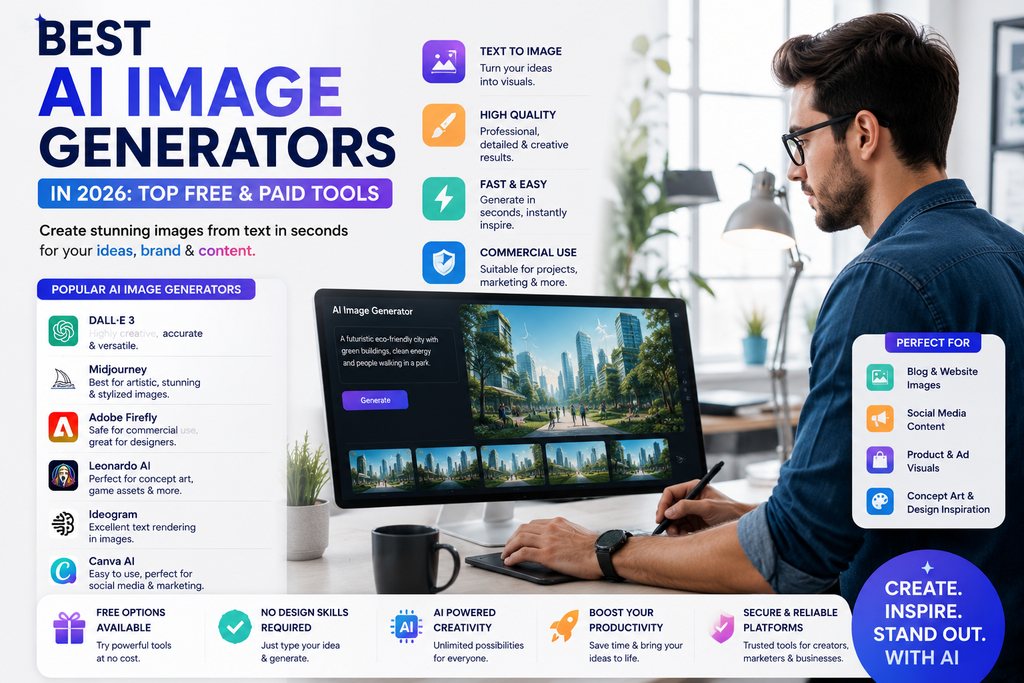
Some AI image generators are better for realistic images. Others focus on artistic styles, fast ideation, design workflows or easy editing. Some offer free access, while others are designed mainly for professional users.
This guide compares the best AI image generators in 2026 so you can choose the right tool based on your goals, budget and workflow.
The best AI image generator depends on what you want to create. Some tools are better for photorealistic images, some for illustrations and concept art, and others for editing or design workflows. The best choice is the one that gives you reliable output, useful controls and commercial terms that fit your needs.
Best AI Image Generators at a Glance
| AI Image Generator | Best For | Free Access | Ideal User |
|---|---|---|---|
| ChatGPT Images | General image creation and editing | Yes/Limited | Most users |
| Midjourney | Artistic and high-style images | No/Check current plan | Creators and designers |
| Adobe Firefly | Commercial creative workflows | Yes/Limited | Designers and businesses |
| Ideogram | Text inside images | Yes/Limited | Marketers and social creators |
| Leonardo AI | Creative assets and concept art | Yes/Limited | Artists and game creators |
| Canva AI | Social and design workflows | Yes/Limited | Marketers and beginners |
| Gemini Images | General AI image creation | Yes/Limited | Google users |
| Microsoft Designer | Quick marketing visuals | Yes/Limited | Small businesses |
Features, free limits and pricing can change. Check each official provider before choosing a paid plan.
What Is an AI Image Generator
An AI image generator is a tool that creates images from text instructions, also called prompts.
For example, you can type:
Create a modern illustration of an AI assistant helping a small business owner in a bright office.
The AI then generates an image based on your description.
Depending on the platform, you may also be able to:
- Edit existing images
- Remove objects
- Replace backgrounds
- Change styles
- Create variations
- Add text
- Generate product mockups
- Expand images
- Create illustrations
- Create realistic photography-style images
AI image generators are useful because they can reduce the time needed for visual ideation and simple design tasks.
They do not replace professional photography or design in every situation, but they can be extremely useful for concepting, marketing and fast creative production.
1. ChatGPT Images — Best Overall for General Users
ChatGPT can create and edit images through natural-language instructions.
That makes it easy for beginners because you do not need to learn a complicated image editor before generating useful visuals.
Best for
- General image creation
- Editing images
- Blog illustrations
- Social media visuals
- Creative concepts
- Marketing graphics
- Everyday users
Why consider ChatGPT Images?
The biggest advantage is simplicity.
You can describe what you want conversationally.
For example:
Create a clean hero image for a blog about AI writing tools. Use a modern technology style with a laptop, floating text elements and a professional workspace.
You can then refine it:
Make the background simpler.
Add more space on the left for a headline.
Change the scene to a dark office.
This conversational editing workflow makes it easier to iterate.
Pros
- Easy to use
- Natural-language prompting
- Useful for image generation and editing
- Good for beginners
- Flexible for many use cases
Limitations
- Results can vary depending on the prompt
- Complex brand-consistent work may still need manual design
- Availability and limits depend on the current plan
Verdict
Choose ChatGPT Images if you want a flexible image generator that is easy to control through conversation.
2. Midjourney — Best for Artistic Images
Midjourney is well known for visually polished, stylized and artistic AI images.
It is especially popular among creators who want strong visual aesthetics.
Best for
- Concept art
- Artistic images
- Fantasy visuals
- Editorial images
- Creative campaigns
- Moodboards
- Visual inspiration
Why consider Midjourney?
If style and visual impact are your main priorities, Midjourney is often worth exploring.
It can be especially useful for:
- Magazine-style visuals
- Creative campaigns
- Character concepts
- Environment design
- Artistic storytelling
Pros
- Strong visual quality
- Excellent artistic styles
- Useful for concept work
- Popular among creators
Limitations
- Less beginner-friendly than some alternatives
- May require more prompt experimentation
- Check current commercial terms before client work
Verdict
Choose Midjourney if your priority is artistic quality and visual style.
3. Adobe Firefly — Best for Creative Professionals
Adobe Firefly is designed to fit into Adobe’s broader creative ecosystem.
That makes it particularly useful for people already using products such as Photoshop, Illustrator or other Adobe tools.
Best for
- Designers
- Marketing teams
- Creative professionals
- Image editing
- Commercial workflows
- Brand assets
Why consider Adobe Firefly?
For professional designers, generating an image is often only the first step.
The image may still need:
- Retouching
- Layout work
- Typography
- Color correction
- Branding
- Exporting
Firefly becomes useful because it can fit naturally into a larger professional design workflow.
Pros
- Strong fit for Adobe users
- Useful for editing workflows
- Designed for professional creative work
- Suitable for business and brand teams
Limitations
- May be more than casual users need
- Best value often comes from the wider Adobe ecosystem
- Check current licensing and plan details
Verdict
Choose Adobe Firefly if you are already using Adobe tools and need AI inside a professional creative workflow.
4. Ideogram — Best for Text in Images
One common weakness of AI image generation has historically been rendering readable text.
Ideogram has built a strong reputation around generating images that include typography.
Best for
- Posters
- Social media graphics
- Quote images
- Promotional visuals
- Thumbnails
- Marketing graphics
Why consider Ideogram?
If your image needs visible words, headlines or slogans, a tool focused on text rendering can save time.
For example:
Create a futuristic poster with the headline “Future of AI” in large readable text.
That kind of task can be more difficult in general-purpose image generators.
Pros
- Useful for text-heavy visuals
- Strong for posters and promotional graphics
- Good for social media content
- Easy to experiment with
Limitations
- Text still needs to be checked carefully
- Brand typography may require manual editing
- Not every image style will suit every use case
Verdict
Choose Ideogram if readable text inside AI-generated images is important to you.
5. Leonardo AI — Best for Creative Assets
Leonardo AI is popular among creators who want more control over visual style and asset generation.
It can be especially useful for concept art, gaming, character design and creative production.
Best for
- Game assets
- Character concepts
- Concept art
- Creative design
- Asset generation
- Illustrations
Why consider Leonardo AI?
Creative projects often need many related assets rather than one standalone image.
A tool with strong style controls can help create a more consistent visual direction.
Pros
- Good for creative workflows
- Useful for concept art
- Suitable for asset generation
- Offers many creative controls
Limitations
- More options can create a learning curve
- Results depend heavily on prompt quality
- Always review current licensing terms
Verdict
Choose Leonardo AI if you need creative assets, concept art or more detailed visual control.
6. Canva AI — Best for Social Media and Marketing Design
Canva combines AI image generation with its existing design tools.
That makes it useful for people who want to create complete finished graphics rather than generating standalone images only.
Best for
- Social media posts
- Presentations
- Ads
- Thumbnails
- Marketing graphics
- Small businesses
- Beginners
Why consider Canva AI?
A business owner might generate an image and immediately place it into:
- An Instagram post
- A presentation
- A flyer
- A banner
- A YouTube thumbnail
This can be faster than using one tool for generation and another for layout.
Pros
- Easy for beginners
- Combines AI with templates
- Useful for marketing
- Good for quick content production
Limitations
- Less control than advanced creative platforms
- Professional designers may want more advanced editing tools
Verdict
Choose Canva AI if you want an easy way to generate and turn images into finished marketing designs.
7. Gemini Images — Best for Google Users
Google’s Gemini ecosystem also includes image-generation capabilities.
It may be a natural choice for users who already rely heavily on Google’s AI and productivity tools.
Best for
- General AI images
- Brainstorming visuals
- Google ecosystem users
- Creative concepts
- Everyday use
Why consider Gemini Images?
If Gemini is already part of your daily workflow, using the same environment for visual generation can reduce tool switching.
Pros
- Useful for general image creation
- Easy for existing Gemini users
- Good for experimentation
- Integrates naturally with Google’s ecosystem
Limitations
- Professional design workflows may require additional tools
- Availability can vary by product and plan
Verdict
Consider Gemini if you already use Google’s AI tools and want image generation in the same ecosystem.
8. Microsoft Designer — Best for Quick Business Graphics
Microsoft Designer combines AI-assisted image creation with simple design workflows.
It can be useful for quick promotional content and business visuals.
Best for
- Social posts
- Promotions
- Business graphics
- Simple design
- Beginners
Why consider Microsoft Designer?
Small businesses often need speed more than advanced creative control.
A simple tool that can generate a visual and quickly turn it into a finished design can be very practical.
Pros
- Beginner-friendly
- Useful for marketing visuals
- Quick design workflow
- Good for simple business use
Limitations
- Less advanced than professional creative tools
- May not suit complex design projects
Verdict
Choose Microsoft Designer if you want quick, simple AI-assisted business graphics.
Best Free AI Image Generators
If you are just starting, there is usually no reason to subscribe immediately.
Several tools provide free access or limited free generations.
Popular options include:
- ChatGPT Images
- Adobe Firefly
- Ideogram
- Leonardo AI
- Canva AI
- Gemini
Free plans can be useful for comparing output quality before spending money.
Which Free AI Image Generator Should You Try First?
Start with the one that matches your main goal.
General images: ChatGPT
Posters and text: Ideogram
Design workflow: Canva
Creative assets: Leonardo AI
Adobe users: Firefly
Google users: Gemini
Then generate the same image with two or three tools and compare the results.
Best AI Image Generator by Use Case
Choosing by use case is often more useful than choosing by popularity.
Best overall: ChatGPT Images
Good for general-purpose generation and conversational editing.
Best for artistic images: Midjourney
Excellent for visually striking and stylized work.
Best for professional design workflows: Adobe Firefly
Strong choice for Adobe users.
Best for text in images: Ideogram
Useful for posters, headlines and promotional visuals.
Best for concept art: Leonardo AI
Good for game assets and creative production.
Best for social media: Canva AI
Useful when generation and design need to happen in one workflow.
Best for Google users: Gemini
Convenient if Gemini is already part of your workflow.
Best AI Image Generators for Bloggers
Bloggers can use AI image generators for:
- Hero images
- Illustrations
- Concept visuals
- Social media previews
- Infographics
- Thumbnail concepts
However, avoid adding AI images only to make an article look longer.
Every image should support the content.
For example:
If the article is about AI writing tools, a useful image could show:
- A writing workflow
- A laptop with AI assistance
- A comparison visual
- A content creation process
That is more useful than an unrelated futuristic robot image.
Best AI Image Generators for Marketers
Marketers can use AI image tools for:
- Ad concepts
- Campaign visuals
- Social posts
- Landing page visuals
- Product mockups
- Promotional graphics
A good workflow is:
Campaign idea → AI visual concepts → Human selection → Brand editing → Final ad
This saves time while keeping the brand team in control.
Best AI Image Generators for Social Media
Social media creators often need a high volume of visuals.
AI image generators can help create:
- Instagram posts
- Facebook graphics
- LinkedIn visuals
- Pinterest images
- YouTube thumbnails
- Short-form video covers
For social media, speed matters, but so does consistency.
Try to create a repeatable prompt style so your images feel connected to the same brand.
Best AI Image Generators for Small Businesses
Small businesses can use AI visuals when they do not have a full-time designer.
Useful examples include:
- Promotional graphics
- Website illustrations
- Seasonal campaign ideas
- Product concepts
- Social content
- Event graphics
The best tool for a small business is often one that combines simplicity with editing features.
That is why platforms such as Canva, ChatGPT and Microsoft Designer can be practical options.
How to Write Better AI Image Prompts
The prompt has a major effect on the final image.
A simple formula is:
Subject + Setting + Style + Composition + Lighting + Details + Format
Instead of:
Create an AI image.
Try:
Create a modern editorial illustration of a content creator using an AI image generator on a laptop. Bright office setting, clean composition, realistic lighting, professional technology aesthetic, horizontal 16:9 layout.
This gives the model much more direction.
Example AI Image Prompt Formula
Use this structure:
Subject: What should appear?
Environment: Where is it?
Style: Realistic, cinematic, editorial, illustration?
Composition: Close-up, wide shot, centered?
Lighting: Bright, soft, dramatic?
Details: Clothing, objects, mood?
Aspect Ratio: Square, portrait, landscape?
Example:
Create a cinematic image of a female designer working with AI-generated art on a large display in a modern studio. Soft natural lighting, realistic photography, professional atmosphere, wide composition, 16:9.
How to Get Better Results from AI Image Generators
1. Be specific
Describe the subject clearly.
2. Explain the visual style
Say whether you want:
- Photorealistic
- Minimal
- Cinematic
- Illustration
- 3D
- Editorial
- Watercolor
3. Specify composition
Tell the AI where the subject should appear.
For example:
Place the subject on the right with empty space on the left for headline text.
This is especially useful for blog headers and ads.
4. Mention lighting
Lighting changes the entire feeling of an image.
Try:
- Soft daylight
- Studio lighting
- Warm sunset
- Dramatic cinematic lighting
5. Iterate
Do not expect the first generation to be perfect.
Refine it step by step.
AI Image Generators for SEO
AI images can support SEO when they genuinely improve the page experience.
For example, you can create:
- Original illustrations
- Comparison graphics
- Process diagrams
- Featured images
But creating an image does not automatically improve rankings.
Use good image SEO practices:
- Compress large images
- Use descriptive file names
- Add useful alt text
- Avoid unnecessary decorative images
- Make sure images are relevant
- Use fast-loading formats when appropriate
Example file name:
best-ai-image-generators-2026.webp
Example alt text:
Comparison of popular AI image generators for creators and marketers
Do not stuff keywords into every image alt attribute.
Are AI-Generated Images Safe for Commercial Use?
This depends on the tool and its current terms.
Before using an AI-generated image commercially, check:
- Commercial usage rights
- Licensing terms
- Brand restrictions
- Content policies
- Ownership terms
This is especially important if you create visuals for clients, advertising or products.
Do not assume every free AI image generator provides the same rights.
AI Image Generators vs Stock Photos
AI images and stock photography solve different problems.
Use AI images when:
- You need a unique concept
- You need a custom illustration
- A real photo does not exist
- You want rapid creative variations
Use stock photos when:
- You need authentic real-world photography
- Accuracy matters
- You need a real location or event
- You want established licensing
A good content strategy can use both.
AI Image Generators vs Human Designers
It does not remove the need for designers.
AI is excellent for:
- Concept generation
- Variations
- Moodboards
- Fast creative experimentation
Human designers remain essential for:
- Brand strategy
- Typography
- Visual hierarchy
- Accessibility
- Final polish
- Campaign consistency
- Complex layouts
The strongest workflow is usually:
AI generation + Human design judgement
How This Article Supports AEO
AEO means Answer Engine Optimization.
The goal is to answer important questions clearly and directly.
What is the best AI image generator?
The best AI image generator depends on the use case. ChatGPT is useful for general generation and editing, Midjourney is strong for artistic visuals, Adobe Firefly fits professional creative workflows, and Ideogram is useful for images containing text.
What is the best free AI image generator?
Several tools offer free or limited free access, including ChatGPT Images, Adobe Firefly, Ideogram, Leonardo AI, Canva AI and Gemini. Free limits vary, so check current plans.
Which AI image generator is best for text?
Ideogram is one of the best-known options for generating images that include readable text.
Which AI image generator is best for beginners?
ChatGPT and Canva are both easy starting points because they allow users to create visuals with simple natural-language instructions.
Are AI image generators free?
Many platforms provide limited free access, but higher generation limits or advanced features usually require paid plans.
How This Article Supports GEO
GEO means Generative Engine Optimization.
To make this page more useful for AI search and answer systems, KeyArtificial should:
- Define every tool clearly
- Use comparison tables
- Answer user questions directly
- Use official vendor sources
- Add original screenshots
- Include hands-on test results
- Add clear recommendations
- Keep product information updated
- Separate facts from opinions
- Show who wrote the article
The strongest GEO improvement will be adding original KeyArtificial tests.
How KeyArtificial Should Test AI Image Generators
To create original value, test every image generator with the same five prompts.
Test 1 — Photorealistic image
Generate a realistic professional office scene.
Test 2 — Text in image
Ask every tool to create a poster with the same headline.
Test 3 — Product image
Generate the same fictional product ad.
Test 4 — Illustration
Generate an editorial illustration for the same blog topic.
Test 5 — Prompt following
Use a detailed prompt with strict composition instructions.
Score each tool on:
- Image quality
- Prompt accuracy
- Text rendering
- Realism
- Editing options
- Ease of use
- Speed
- Value
Once you complete the testing, publish the results.
That gives readers a stronger reason to trust KeyArtificial.
Frequently Asked Questions
What are the best AI image generators in 2026?
Popular options include ChatGPT Images, Midjourney, Adobe Firefly, Ideogram, Leonardo AI, Canva AI, Gemini and Microsoft Designer. The best tool depends on the type of image you want to create.
What is the best AI image generator for beginners?
ChatGPT and Canva are easy options for beginners because they use straightforward natural-language workflows.
What is the best free AI image generator?
There is no single best free tool. ChatGPT, Firefly, Ideogram, Leonardo AI, Canva and Gemini all provide free or limited free access depending on current plans.
Which AI image generator is best for realistic images?
Several platforms can produce realistic images, but quality depends heavily on the prompt, model and settings. Compare the same prompt across multiple tools before choosing one.
Which AI image generator is best for art?
Midjourney and Leonardo AI are popular choices for artistic and creative image generation.
Which AI image generator is best for marketing?
Canva AI, Adobe Firefly and ChatGPT can all be useful for marketing depending on whether you need finished designs, professional editing or fast concept generation.
Can AI image generators create logos?
They can create logo concepts, but final logos usually need human design work. AI-generated logos may also have typography and originality issues.
Can I use AI-generated images commercially?
Sometimes, but commercial rights depend on the platform and plan. Check the provider’s current terms before using generated images in paid campaigns, products or client work.
Are AI-generated images good for SEO?
They can improve content when they are relevant, original and useful. Optimize image size, file names and alt text, and avoid adding unnecessary images only for keyword targeting.
Final Verdict: Which AI Image Generator Should You Choose?
Choose based on your actual need.
ChatGPT Images: Best general starting point.
Midjourney: Best for artistic and visually striking images.
Adobe Firefly: Best for professional Adobe workflows.
Ideogram: Best for text inside images.
Leonardo AI: Best for concept art and creative assets.
Canva AI: Best for social media and marketing graphics.
Gemini: Good for Google ecosystem users.
Microsoft Designer: Good for fast business visuals.
Do not subscribe to every AI image generator.
Test two or three tools using the same prompt and compare the results.
The best AI image generator is the one that gives you the right combination of quality, control, speed and licensing for your specific workflow.
For more categories, continue to our main Best AI Tools in 2026 pillar guide and explore AI writing, video, coding, research and productivity tools.
About the Author
Gurudeep Singh writes about artificial intelligence, AI tools and practical AI workflows at KeyArtificial.
His goal is to make fast-changing AI products easier to understand through clear guides, comparisons and practical recommendations.